Nicksxs's Blog

What hurts more, the pain of hard work or the pain of regret?

又做了个题,看记录是以前用 C++写过的,现在捋一捋思路,用 Java 再写了一下,思路还是比较清晰的,但是边界细节处理得比较差

简要介绍

Given a string s, find the length of the longest substring without repeating characters.

样例

Example 1:

Input: s = "abcabcbb"
Output: 3
Explanation: The answer is "abc", with the length of 3.

Example 2:

Input: s = "bbbbb"
Output: 1
Explanation: The answer is "b", with the length of 1.

Example 3:

Input: s = "pwwkew"
Output: 3
Explanation: The answer is "wke", with the length of 3.
Notice that the answer must be a substring, "pwke" is a subsequence and not a substring.

Example 4:

Input: s = ""
Output: 0

就是一个最长不重复的字符串长度,因为也是中等难度的题,不太需要特别复杂的思考,最基本的就是O(N*N)两重循环,不过显然不太好,万一超时间,还有一种就是线性复杂度的了,这个就是需要搞定一个思路,比如字符串时 abcdefgaqwrty,比如遍历到第二个a的时候其实不用再从头去遍历了,只要把前面那个a给排除掉,继续往下算就好了

class Solution {
    Map<String, Integer> counter = new HashMap<>();
    public int lengthOfLongestSubstring(String s) {
        int length = s.length();
        // 当前的长度
        int subStringLength = 0;
        // 最长的长度
        int maxSubStringLength = 0;
        // 考虑到重复的位置已经被跳过的情况,即已经在当前长度的字符串范围之前的重复字符不需要回溯
        int lastDuplicatePos = -1;
        for (int i = 0; i < length; i++) {
            // 使用 map 存储字符和上一次出现的位置,如果存在并且大于上一次重复位置
            if (counter.get(String.valueOf(s.charAt(i))) != null && counter.get(String.valueOf(s.charAt(i))) > lastDuplicatePos) {
                // 记录重复位置
                lastDuplicatePos = counter.get(String.valueOf(s.charAt(i)));
                // 重置不重复子串的长度,减去重复起点
                subStringLength = i - counter.get(String.valueOf(s.charAt(i))) - 1;
                // 替换当前位置
                counter.replace(String.valueOf(s.charAt(i)), i);
            } else {
                // 如果不存在就直接 put
                counter.put(String.valueOf(s.charAt(i)), i);
            }
            // 长度累加
            subStringLength++;
            if (subStringLength > maxSubStringLength) {
                // 简单替换
                maxSubStringLength = subStringLength;
            }
        }
        return maxSubStringLength;
    }
}

注释应该写的比较清楚了。

小工记三

前面这两周周末也都去老丈人家帮忙了,上上周周六先是去了那个在装修的旧房子那,把三楼收拾了下,因为要搬进来住,来不及等二楼装修好,就要把三楼里的东西都整理干净,这个活感觉是比较 easy,原来是就准备把三楼当放东西仓储的地方了,我们乡下大部分三层楼都是这么用的,这次也是没办法,之前搬进来的木头什么的都搬出去,主要是这上面灰尘太多,后面清理鼻孔的时候都是黑色的了,把东西都搬出去以后主要是地还是很脏,就扫了地拖了地,因为是水泥地,灰尘又太多了,拖起来都是会灰尘扬起来,整个脱完了的确干净很多,然而这会就出了个大乌龙,我们清理的是三楼的西边一间,结果老丈人上来说要住东边那间的🤦‍♂️,不过其实西边的也得清理,因为还是要放被子什么的,不算是白费功夫,接着清理东边那间,之前这个房子做过群租房,里面有个高低铺的床,当时觉得可以用在放被子什么的就没扔,只是拆掉了放旁边,我们就把它擦干净了又装好,发现螺丝🔩少了几个,亘古不变的真理,拆了以后装要不就多几个要不就少几个,不是很牢靠,不过用来放放被子省得放地上总还是可以的,对了前面还做了个事情就是铺地毯,其实也不是地毯,就是类似于墙布雨篷布那种,别人不用了送给我们的,三楼水泥地也不会铺瓷砖地板了就放一下,干净好看点,不过大小不合适要裁一下,那把剪刀是真的太难用了,我手都要抽筋了,它就是刀口只有一小个点是能剪下来的,其他都是钝的,后来还是用刀片直接裁,铺好以后,真的感觉也不太一样了,焕然一新的感觉
差不多中午了就去吃饭了,之前两次是去了一家小饭店,还是还比较干净,但是店里菜不好吃,还死贵,这次去了一家小快餐店,口味好,便宜,味道是真的不错,带鱼跟黄鱼都好吃,一点都不腥,我对这类比较腥的鱼真的是很挑剔的,基本上除了家里做的很少吃外面的,那天抱着试试的态度吃了下,真的还不错,后来丈母娘说好像这家老板是给别人结婚喜事酒席当厨师的,怪不得做的好吃,其实本来是有一点小抗拒,怕不干净什么的,后来发现菜很好吃,而且可能是老丈人跟干活的师傅去吃的比较多,老板很客气,我们吃完饭,还给我们买了葡萄吃,不过这家店有一个槽点,就是饭比较不好吃,有时候会夹生,不过后面聊起来其实是这种小菜馆饭点的通病,烧的太早太多容易多出来浪费,烧的迟了不够吃,而且大的电饭锅比较不容易烧好。
下午前面还是在处理三楼的,窗户上各种钉子,实在是太多了,我后面在走廊上排了一排🤦‍♂️,有些是直接断了,有些是就撬了出来,感觉我在杭州租房也没有这样子各种钉钉子,挂下衣服什么的也不用这么多吧,比较不能理解,搞得到处都是钉子。那天我爸也去帮忙了,主要是在卫生间里做白缝,其实也是个技术活,印象中好像我小时候自己家里也做过这个事情,但是比较模糊了,后面我们三楼搞完了就去帮我爸了,前面是我老婆二爹在那先刷上白缝,这里叫白缝,有些考究的也叫美缝,就是瓷砖铺完之后的缝,如果不去弄的话,里面水泥的颜色就露出来了,而且容易渗水,所以就要用白水泥加胶水搅拌之后糊在缝上,但是也不是直接糊,先要把缝抠一抠,因为铺瓷砖的还不会仔细到每个缝里的水泥都是一样满,而且也需要一些空间糊上去,不然就太表面的一层很容易被水直接冲掉了,然后这次其实也不是用的白水泥,而是直接现成买来就已经配好的用来填缝的,兑水搅拌均匀就好了,后面就主要是我跟我爸在搞,那个时候真的觉得我实在是太胖了,蹲下去真的没一会就受不了了,膝盖什么的太难受了,后面我跪着刷,然后膝盖又疼,也是比较不容易,不过我爸动作很快,我中间跪累了休息一会,我爸就能搞一大片,后面其实我也没做多少(谦虚一下),总体来讲这次不是很累,就是蹲着跪着腿有点受不了,是应该好好减肥了。

这个问题也是面试中常被问到的,就抽空来了解下这个,跳过一大段前面初始化的逻辑,
对于一条select * from t1 where id = #{id}这样的 sql,在初始化扫描 mapper 的xml文件的时候会根据是否是 dynamic 来判断生成 DynamicSqlSource 还是 RawSqlSource,这里它是一条 RawSqlSource,
在这里做了替换,将#{}替换成了?

前面说的是否 dynamic 就是在这里进行判断

// org.apache.ibatis.scripting.xmltags.XMLScriptBuilder#parseScriptNode
public SqlSource parseScriptNode() {
    MixedSqlNode rootSqlNode = parseDynamicTags(context);
    SqlSource sqlSource;
    if (isDynamic) {
      sqlSource = new DynamicSqlSource(configuration, rootSqlNode);
    } else {
      sqlSource = new RawSqlSource(configuration, rootSqlNode, parameterType);
    }
    return sqlSource;
  }
// org.apache.ibatis.scripting.xmltags.XMLScriptBuilder#parseDynamicTags
protected MixedSqlNode parseDynamicTags(XNode node) {
    List<SqlNode> contents = new ArrayList<>();
    NodeList children = node.getNode().getChildNodes();
    for (int i = 0; i < children.getLength(); i++) {
      XNode child = node.newXNode(children.item(i));
      if (child.getNode().getNodeType() == Node.CDATA_SECTION_NODE || child.getNode().getNodeType() == Node.TEXT_NODE) {
        String data = child.getStringBody("");
        TextSqlNode textSqlNode = new TextSqlNode(data);
        if (textSqlNode.isDynamic()) {
          contents.add(textSqlNode);
          isDynamic = true;
        } else {
          contents.add(new StaticTextSqlNode(data));
        }
      } else if (child.getNode().getNodeType() == Node.ELEMENT_NODE) { // issue #628
        String nodeName = child.getNode().getNodeName();
        NodeHandler handler = nodeHandlerMap.get(nodeName);
        if (handler == null) {
          throw new BuilderException("Unknown element <" + nodeName + "> in SQL statement.");
        }
        handler.handleNode(child, contents);
        isDynamic = true;
      }
    }
    return new MixedSqlNode(contents);
  }
// org.apache.ibatis.scripting.xmltags.TextSqlNode#isDynamic
  public boolean isDynamic() {
    DynamicCheckerTokenParser checker = new DynamicCheckerTokenParser();
    GenericTokenParser parser = createParser(checker);
    parser.parse(text);
    return checker.isDynamic();
  }
    private GenericTokenParser createParser(TokenHandler handler) {
    return new GenericTokenParser("${", "}", handler);
  }

可以看到其中一个条件就是是否有${}这种占位符,假如说上面的 sql 换成 ${},那么可以看到它会在这里创建一个 dynamicSqlSource,

// org.apache.ibatis.scripting.xmltags.DynamicSqlSource
public class DynamicSqlSource implements SqlSource {

  private final Configuration configuration;
  private final SqlNode rootSqlNode;

  public DynamicSqlSource(Configuration configuration, SqlNode rootSqlNode) {
    this.configuration = configuration;
    this.rootSqlNode = rootSqlNode;
  }

  @Override
  public BoundSql getBoundSql(Object parameterObject) {
    DynamicContext context = new DynamicContext(configuration, parameterObject);
    rootSqlNode.apply(context);
    SqlSourceBuilder sqlSourceParser = new SqlSourceBuilder(configuration);
    Class<?> parameterType = parameterObject == null ? Object.class : parameterObject.getClass();
    SqlSource sqlSource = sqlSourceParser.parse(context.getSql(), parameterType, context.getBindings());
    BoundSql boundSql = sqlSource.getBoundSql(parameterObject);
    context.getBindings().forEach(boundSql::setAdditionalParameter);
    return boundSql;
  }

}

这里眼尖的同学可能就可以看出来了,RawSqlSource 在初始化的时候已经经过了 parse,把#{}替换成了?占位符,但是 DynamicSqlSource 并没有
再看这个图,我们发现在这的时候还没有进行替换
然后往里跟
好像是这里了

这里 rootSqlNode.apply 其实是一个对原来 sql 的解析结果的一个循环调用,不同类型的标签会构成不同的 node,像这里就是一个 textSqlNode

可以发现到这我们的 sql 已经被替换了,而且是直接作为 string 类型替换的,所以可以明白了这个问题所在,就是注入,不过细心的同学发现其实这里是有个

理论上还是可以做过滤的,不过好像现在没用起来。
我们前面可以发现对于#{}是在启动扫描 mapper的 xml 文件就替换成了 ?,然后是在什么时候变成实际的值的呢

发现到这的时候还是没有替换,其实说白了也就是 prepareStatement 那一套,

在这里进行替换,会拿到 org.apache.ibatis.mapping.ParameterMapping,然后进行替换,因为会带着类型信息,所以不用担心注入咯

因为活实在比较多,也不太好叫大工(活比较杂散),相比上一次我跟 LD 俩人晚起了一点,我真的是只要有事,早上就醒的很早,准备八点出发的,六点就醒了,然后想继续睡就一直做梦🤦‍♂️,差不多八点半多到的丈人家,他们应该已经干了有一会了,我们到了以后就分配给我撬地板的活,上次说的那个敲掉柜子的房间里,还铺着质地还不错的木地板,但是也不想要了,得撬掉重新铺。
拿着撬棍和榔头就上楼去干了,浙江这几天的天气,最高温度一般 38、9,楼上那个房间也没风扇,有了也不能用,都是灰尘,撬了两下,我感觉我体内的水就像真气爆发一样变成汗炸了出来,眼睛全被汗糊住了,可能大部分人不太了解地板是怎么铺的,一般是在地面先铺一层混凝土,混凝土中间嵌进去规则的长条木条,然后真正的地板一块块的都是钉在那个木条上,用那种气枪钉和普通的钉子,并且块跟块之前还有一个木头的槽结构相互耦合,然后边缘的一圈在用较薄的木板将整个木地板封边(这些词都是我现造的),边缘的用的钉子会更多,所以那几下真的很用力,而且撬地板,得蹲下起来,如此反复,对于我这个体重快超过身高的中年人来说的确是非常大的挑战,接下来继续撬了几个,已经有种要虚脱晕倒的感觉了,及时去喝水擦了汗,又歇了一会,为啥一上来就这么拼呢,主要是因为那个房间丈人在干活的时候是直接看得到的🤦‍♂️,后来被 LD 一顿教育,本来就是去帮忙的,又不是专业做这个的,急啥。
喝了水之后,又稍稍歇了一会,就开始继续撬了,本来觉得这个地板撬着好像还行,房间不大,没多久就撬完了,撬完之后喝了点饮料(补充点糖分,早餐吃得少,有点低血糖),然后看到 LD 在撬下面的木条了,这个动作开始了那天最大的经验值收集行动,前面说了这个木条一般是跟混凝土一块铺上去的,但是谁也没想到,这个混凝土铺上去的时候竟然处理的这么随意,根本没考虑跟下面的贴合,所以撬木条的时候直接把木条跟木条中间大块大块的混凝土一块撬起来了,想想那重量,于是我这靠蛮力干活的,就用力把木条带着混凝土一块撬了起来,还沾沾自喜,但是发现结果是撬起来一块之后,体力值瞬间归零,上一篇我也提到了,其实干这类活也是很有技巧性的,但是上次的是我没学会,可能需要花时间学的,但是这次是LD 用她的纤细胳膊教会我的,我在撬的时候,屏住一口气,双手用力,起,大概是吃好几口奶的力气都用出来了,但是 LD 在我休息的时候,慢慢悠悠的,先把撬棍挤到木条或者混凝土跟下层的缝里,然后往下垫一小块混凝土碎石,然后轻轻松松的扳两下,就撬开了,亏我高中的时候引以为傲的物理成绩,作为物理课代表,这么浅显易懂的杠杆原理都完全不会用到生活里,后面在用这个技巧撬的过程中,真的觉得自己蠢到家了,当然在明白了用点杠杆原理之后,撬地板的活就变得慢慢悠悠,悠哉悠哉的了(其实还是很热的,披着毛巾擦眼睛)。
上午的活差不多完了,后面就是把撬出来的混凝土和地板条丢下去,地上铺着不用了的被子,然后就是午饭和午休环节了,午饭换了一家快餐,味道非常可以,下午的活就比较单调了,帮忙清理了上去扔下来的混凝土碎块跟木条,然后稍微打扫了下,老丈人就让我们回家了,接着上次说的,还是觉得比跑步啥的消耗大太多了,那汗流的,一口就能喝完一瓶 500 毫升左右的矿泉水。

本来是想取个像现在那些公众号转了又转的文章标题,”面试官再问你xxxxx,就把这篇文章甩给他看”这种标题,但是觉得实在太 low 了,还是用一部我比较喜欢的电影里的一句台词,《人在囧途》里王宝强对着那张老板给他的欠条,看不懂字时候说的那句,这些都是些啥(第四声)
当我刚开始面 Java 的时候,其实我真的没注意这方面的东西,实话说就是不知道这些是啥,开发中用过 Interceptor和 Aop,了解 aop 的实现原理,但是不知道 Java web 中的 Filter 是怎么回事,知道 dubbo 的 filter,就这样,所以被问到了的确是回答不出来,可能就觉得这个渣渣,这么简单的都不会,所以还是花点时间来看看这个是个啥,为了避免我口吐芬芳,还是耐下性子来简单说下这几个东西
首先是 servlet,怎么去解释这个呢,因为之前是 PHPer,所以比较喜欢用它来举例子,在普通的 PHP 的 web 应用中一般有几部分组成,接受 HTTP 请求的是前置的 nginx 或者 apache,但是这俩玩意都是只能处理静态的请求,远古时代 PHP 和 HTML 混编是通过 apache 的 php module,跟后来 nginx 使用 php-fpm 其实道理类似,就是把请求中需要 PHP 处理的转发给 PHP,在 Java 中呢,是有个比较牛叉的叫 Tomcat 的,它可以把请求转成 servlet,而 servlet 其实就是一种实现了特定接口的 Java 代码,


package javax.servlet;

import java.io.IOException;

/**
 * Defines methods that all servlets must implement.
 *
 * <p>
 * A servlet is a small Java program that runs within a Web server. Servlets
 * receive and respond to requests from Web clients, usually across HTTP, the
 * HyperText Transfer Protocol.
 *
 * <p>
 * To implement this interface, you can write a generic servlet that extends
 * <code>javax.servlet.GenericServlet</code> or an HTTP servlet that extends
 * <code>javax.servlet.http.HttpServlet</code>.
 *
 * <p>
 * This interface defines methods to initialize a servlet, to service requests,
 * and to remove a servlet from the server. These are known as life-cycle
 * methods and are called in the following sequence:
 * <ol>
 * <li>The servlet is constructed, then initialized with the <code>init</code>
 * method.
 * <li>Any calls from clients to the <code>service</code> method are handled.
 * <li>The servlet is taken out of service, then destroyed with the
 * <code>destroy</code> method, then garbage collected and finalized.
 * </ol>
 *
 * <p>
 * In addition to the life-cycle methods, this interface provides the
 * <code>getServletConfig</code> method, which the servlet can use to get any
 * startup information, and the <code>getServletInfo</code> method, which allows
 * the servlet to return basic information about itself, such as author,
 * version, and copyright.
 *
 * @see GenericServlet
 * @see javax.servlet.http.HttpServlet
 */
public interface Servlet {

    /**
     * Called by the servlet container to indicate to a servlet that the servlet
     * is being placed into service.
     *
     * <p>
     * The servlet container calls the <code>init</code> method exactly once
     * after instantiating the servlet. The <code>init</code> method must
     * complete successfully before the servlet can receive any requests.
     *
     * <p>
     * The servlet container cannot place the servlet into service if the
     * <code>init</code> method
     * <ol>
     * <li>Throws a <code>ServletException</code>
     * <li>Does not return within a time period defined by the Web server
     * </ol>
     *
     *
     * @param config
     *            a <code>ServletConfig</code> object containing the servlet's
     *            configuration and initialization parameters
     *
     * @exception ServletException
     *                if an exception has occurred that interferes with the
     *                servlet's normal operation
     *
     * @see UnavailableException
     * @see #getServletConfig
     */
    public void init(ServletConfig config) throws ServletException;

    /**
     *
     * Returns a {@link ServletConfig} object, which contains initialization and
     * startup parameters for this servlet. The <code>ServletConfig</code>
     * object returned is the one passed to the <code>init</code> method.
     *
     * <p>
     * Implementations of this interface are responsible for storing the
     * <code>ServletConfig</code> object so that this method can return it. The
     * {@link GenericServlet} class, which implements this interface, already
     * does this.
     *
     * @return the <code>ServletConfig</code> object that initializes this
     *         servlet
     *
     * @see #init
     */
    public ServletConfig getServletConfig();

    /**
     * Called by the servlet container to allow the servlet to respond to a
     * request.
     *
     * <p>
     * This method is only called after the servlet's <code>init()</code> method
     * has completed successfully.
     *
     * <p>
     * The status code of the response always should be set for a servlet that
     * throws or sends an error.
     *
     *
     * <p>
     * Servlets typically run inside multithreaded servlet containers that can
     * handle multiple requests concurrently. Developers must be aware to
     * synchronize access to any shared resources such as files, network
     * connections, and as well as the servlet's class and instance variables.
     * More information on multithreaded programming in Java is available in <a
     * href
     * ="http://java.sun.com/Series/Tutorial/java/threads/multithreaded.html">
     * the Java tutorial on multi-threaded programming</a>.
     *
     *
     * @param req
     *            the <code>ServletRequest</code> object that contains the
     *            client's request
     *
     * @param res
     *            the <code>ServletResponse</code> object that contains the
     *            servlet's response
     *
     * @exception ServletException
     *                if an exception occurs that interferes with the servlet's
     *                normal operation
     *
     * @exception IOException
     *                if an input or output exception occurs
     */
    public void service(ServletRequest req, ServletResponse res)
            throws ServletException, IOException;

    /**
     * Returns information about the servlet, such as author, version, and
     * copyright.
     *
     * <p>
     * The string that this method returns should be plain text and not markup
     * of any kind (such as HTML, XML, etc.).
     *
     * @return a <code>String</code> containing servlet information
     */
    public String getServletInfo();

    /**
     * Called by the servlet container to indicate to a servlet that the servlet
     * is being taken out of service. This method is only called once all
     * threads within the servlet's <code>service</code> method have exited or
     * after a timeout period has passed. After the servlet container calls this
     * method, it will not call the <code>service</code> method again on this
     * servlet.
     *
     * <p>
     * This method gives the servlet an opportunity to clean up any resources
     * that are being held (for example, memory, file handles, threads) and make
     * sure that any persistent state is synchronized with the servlet's current
     * state in memory.
     */
    public void destroy();
}

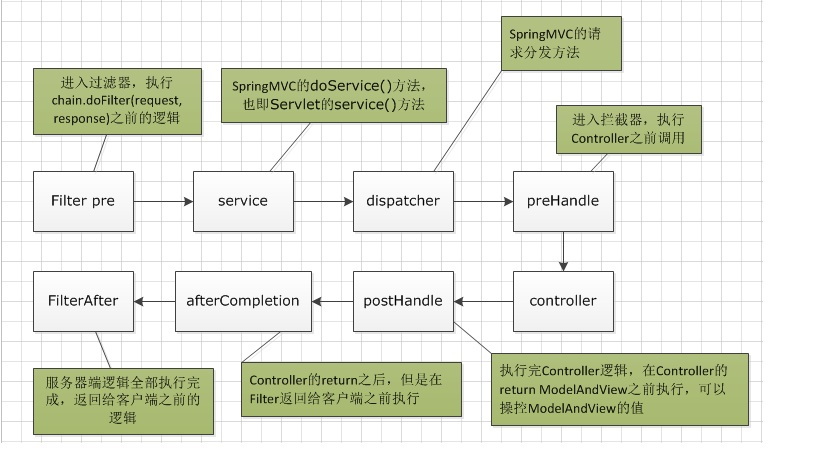
重点看 servlet 的 service方法,就是接受请求,处理完了给响应,不说细节,不然光 Tomcat 的能说半年,所以呢再进一步去理解,其实就能知道,就是一个先后的问题,盗个图

filter 跟后两者最大的不一样其实是一个基于 servlet,在非常外层做的处理,然后是 interceptor 的 prehandle 跟 posthandle,接着才是我们常规的 aop,就这么点事情,做个小试验吧(还是先补段代码吧)

Filter

// ---------------------------------------------------- FilterChain Methods

    /**
     * Invoke the next filter in this chain, passing the specified request
     * and response.  If there are no more filters in this chain, invoke
     * the <code>service()</code> method of the servlet itself.
     *
     * @param request The servlet request we are processing
     * @param response The servlet response we are creating
     *
     * @exception IOException if an input/output error occurs
     * @exception ServletException if a servlet exception occurs
     */
    @Override
    public void doFilter(ServletRequest request, ServletResponse response)
        throws IOException, ServletException {

        if( Globals.IS_SECURITY_ENABLED ) {
            final ServletRequest req = request;
            final ServletResponse res = response;
            try {
                java.security.AccessController.doPrivileged(
                    new java.security.PrivilegedExceptionAction<Void>() {
                        @Override
                        public Void run()
                            throws ServletException, IOException {
                            internalDoFilter(req,res);
                            return null;
                        }
                    }
                );
            } catch( PrivilegedActionException pe) {
                Exception e = pe.getException();
                if (e instanceof ServletException)
                    throw (ServletException) e;
                else if (e instanceof IOException)
                    throw (IOException) e;
                else if (e instanceof RuntimeException)
                    throw (RuntimeException) e;
                else
                    throw new ServletException(e.getMessage(), e);
            }
        } else {
            internalDoFilter(request,response);
        }
    }
    private void internalDoFilter(ServletRequest request,
                                  ServletResponse response)
        throws IOException, ServletException {

        // Call the next filter if there is one
        if (pos < n) {
            ApplicationFilterConfig filterConfig = filters[pos++];
            try {
                Filter filter = filterConfig.getFilter();

                if (request.isAsyncSupported() && "false".equalsIgnoreCase(
                        filterConfig.getFilterDef().getAsyncSupported())) {
                    request.setAttribute(Globals.ASYNC_SUPPORTED_ATTR, Boolean.FALSE);
                }
                if( Globals.IS_SECURITY_ENABLED ) {
                    final ServletRequest req = request;
                    final ServletResponse res = response;
                    Principal principal =
                        ((HttpServletRequest) req).getUserPrincipal();

                    Object[] args = new Object[]{req, res, this};
                    SecurityUtil.doAsPrivilege ("doFilter", filter, classType, args, principal);
                } else {
                    filter.doFilter(request, response, this);
                }
            } catch (IOException | ServletException | RuntimeException e) {
                throw e;
            } catch (Throwable e) {
                e = ExceptionUtils.unwrapInvocationTargetException(e);
                ExceptionUtils.handleThrowable(e);
                throw new ServletException(sm.getString("filterChain.filter"), e);
            }
            return;
        }

        // We fell off the end of the chain -- call the servlet instance
        try {
            if (ApplicationDispatcher.WRAP_SAME_OBJECT) {
                lastServicedRequest.set(request);
                lastServicedResponse.set(response);
            }

            if (request.isAsyncSupported() && !servletSupportsAsync) {
                request.setAttribute(Globals.ASYNC_SUPPORTED_ATTR,
                        Boolean.FALSE);
            }
            // Use potentially wrapped request from this point
            if ((request instanceof HttpServletRequest) &&
                    (response instanceof HttpServletResponse) &&
                    Globals.IS_SECURITY_ENABLED ) {
                final ServletRequest req = request;
                final ServletResponse res = response;
                Principal principal =
                    ((HttpServletRequest) req).getUserPrincipal();
                Object[] args = new Object[]{req, res};
                SecurityUtil.doAsPrivilege("service",
                                           servlet,
                                           classTypeUsedInService,
                                           args,
                                           principal);
            } else {
                servlet.service(request, response);
            }
        } catch (IOException | ServletException | RuntimeException e) {
            throw e;
        } catch (Throwable e) {
            e = ExceptionUtils.unwrapInvocationTargetException(e);
            ExceptionUtils.handleThrowable(e);
            throw new ServletException(sm.getString("filterChain.servlet"), e);
        } finally {
            if (ApplicationDispatcher.WRAP_SAME_OBJECT) {
                lastServicedRequest.set(null);
                lastServicedResponse.set(null);
            }
        }
    }

注意看这一行
filter.doFilter(request, response, this);
是不是看懂了,就是个 filter 链,但是这个代码在哪呢,org.apache.catalina.core.ApplicationFilterChain#doFilter
然后是interceptor,

protected void doDispatch(HttpServletRequest request, HttpServletResponse response) throws Exception {
        HttpServletRequest processedRequest = request;
        HandlerExecutionChain mappedHandler = null;
        boolean multipartRequestParsed = false;
        WebAsyncManager asyncManager = WebAsyncUtils.getAsyncManager(request);

        try {
            try {
                ModelAndView mv = null;
                Object dispatchException = null;

                try {
                    processedRequest = this.checkMultipart(request);
                    multipartRequestParsed = processedRequest != request;
                    mappedHandler = this.getHandler(processedRequest);
                    if (mappedHandler == null) {
                        this.noHandlerFound(processedRequest, response);
                        return;
                    }

                    HandlerAdapter ha = this.getHandlerAdapter(mappedHandler.getHandler());
                    String method = request.getMethod();
                    boolean isGet = "GET".equals(method);
                    if (isGet || "HEAD".equals(method)) {
                        long lastModified = ha.getLastModified(request, mappedHandler.getHandler());
                        if ((new ServletWebRequest(request, response)).checkNotModified(lastModified) && isGet) {
                            return;
                        }
                    }

                    /** 
                     * 看这里看这里‼️
                     */
                    if (!mappedHandler.applyPreHandle(processedRequest, response)) {
                        return;
                    }

                    mv = ha.handle(processedRequest, response, mappedHandler.getHandler());
                    if (asyncManager.isConcurrentHandlingStarted()) {
                        return;
                    }

                    this.applyDefaultViewName(processedRequest, mv);
                    /** 
                     * 再看这里看这里‼️
                     */
                    mappedHandler.applyPostHandle(processedRequest, response, mv);
                } catch (Exception var20) {
                    dispatchException = var20;
                } catch (Throwable var21) {
                    dispatchException = new NestedServletException("Handler dispatch failed", var21);
                }

                this.processDispatchResult(processedRequest, response, mappedHandler, mv, (Exception)dispatchException);
            } catch (Exception var22) {
                this.triggerAfterCompletion(processedRequest, response, mappedHandler, var22);
            } catch (Throwable var23) {
                this.triggerAfterCompletion(processedRequest, response, mappedHandler, new NestedServletException("Handler processing failed", var23));
            }

        } finally {
            if (asyncManager.isConcurrentHandlingStarted()) {
                if (mappedHandler != null) {
                    mappedHandler.applyAfterConcurrentHandlingStarted(processedRequest, response);
                }
            } else if (multipartRequestParsed) {
                this.cleanupMultipart(processedRequest);
            }

        }
    }

代码在哪呢,org.springframework.web.servlet.DispatcherServlet#doDispatch,然后才是我们自己写的 aop,是不是差不多明白了,嗯,接下来是例子
写个 filter

public class DemoFilter extends HttpServlet implements Filter {
    @Override
    public void init(FilterConfig filterConfig) throws ServletException {
        System.out.println("==>DemoFilter启动");
    }

    @Override
    public void doFilter(ServletRequest servletRequest, ServletResponse servletResponse, FilterChain filterChain) throws IOException, ServletException {
        // 将请求转换成HttpServletRequest 请求
        HttpServletRequest req = (HttpServletRequest) servletRequest;
        HttpServletResponse resp = (HttpServletResponse) servletResponse;
        System.out.println("before filter");
        filterChain.doFilter(req, resp);
        System.out.println("after filter");
    }

    @Override
    public void destroy() {

    }
}

因为用的springboot,所以就不写 web.xml 了,写个配置类

@Configuration
public class FilterConfiguration {
    @Bean
    public FilterRegistrationBean filterDemo4Registration() {
        FilterRegistrationBean registration = new FilterRegistrationBean();
        //注入过滤器
        registration.setFilter(new DemoFilter());
        //拦截规则
        registration.addUrlPatterns("/*");
        //过滤器名称
        registration.setName("DemoFilter");
        //是否自动注册 false 取消Filter的自动注册
        registration.setEnabled(true);
        //过滤器顺序
        registration.setOrder(1);
        return registration;
    }

}

然后再来个 interceptor 和 aop,以及一个简单的请求处理

public class DemoInterceptor extends HandlerInterceptorAdapter {
    @Override
    public boolean preHandle(HttpServletRequest request, HttpServletResponse response, Object handler) throws Exception {
        System.out.println("preHandle test");
        return true;
    }

    @Override
    public void postHandle(HttpServletRequest request, HttpServletResponse response, Object handler, ModelAndView modelAndView) throws Exception {
        System.out.println("postHandle test");
    }
}
@Aspect
@Component
public class DemoAspect {

    @Pointcut("execution( public * com.nicksxs.springbootdemo.demo.DemoController.*())")
    public void point() {

    }

    @Before("point()")
    public void doBefore(){
        System.out.println("==doBefore==");
    }

    @After("point()")
    public void doAfter(){
        System.out.println("==doAfter==");
    }
}
@RestController
public class DemoController {

    @RequestMapping("/hello")
    @ResponseBody
    public String hello() {
        return "hello world";
    }
}

好了,请求一下,看看 stdout,

搞定完事儿~

0%