Nicksxs's Blog

What hurts more, the pain of hard work or the pain of regret?

前面介绍了 connector,这里边还有个很重要的概念是 Coyote,真正将前面的 connector 跟后面的 container 做了连接,
org.apache.tomcat.util.net.AbstractEndpoint#createSocketProcessor 从这里开始
然后会调用到 org.apache.tomcat.util.net.NioEndpoint#createSocketProcessor

@Override
protected SocketProcessorBase<NioChannel> createSocketProcessor(
        SocketWrapperBase<NioChannel> socketWrapper, SocketEvent event) {
    return new SocketProcessor(socketWrapper, event);
}

里面实际的是 new 了
org.apache.tomcat.util.net.NioEndpoint.SocketProcessor#SocketProcessor

protected class SocketProcessor extends SocketProcessorBase<NioChannel> {

        public SocketProcessor(SocketWrapperBase<NioChannel> socketWrapper, SocketEvent event) {
            super(socketWrapper, event);
        }

        @Override
        protected void doRun() {
            /*
             * Do not cache and re-use the value of socketWrapper.getSocket() in
             * this method. If the socket closes the value will be updated to
             * CLOSED_NIO_CHANNEL and the previous value potentially re-used for
             * a new connection. That can result in a stale cached value which
             * in turn can result in unintentionally closing currently active
             * connections.
             */
            Poller poller = NioEndpoint.this.poller;
            if (poller == null) {
                socketWrapper.close();

然后是 org.apache.tomcat.util.net.NioEndpoint.SocketProcessor#doRun 这里开始运行

protected void doRun() {
    /*
     * Do not cache and re-use the value of socketWrapper.getSocket() in
     * this method. If the socket closes the value will be updated to
     * CLOSED_NIO_CHANNEL and the previous value potentially re-used for
     * a new connection. That can result in a stale cached value which
     * in turn can result in unintentionally closing currently active
     * connections.
     */
    Poller poller = NioEndpoint.this.poller;
    if (poller == null) {
        socketWrapper.close();
        return;
    }

    try {
        int handshake = -1;
        try {
            if (socketWrapper.getSocket().isHandshakeComplete()) {
                // No TLS handshaking required. Let the handler
                // process this socket / event combination.
                handshake = 0;
            } else if (event == SocketEvent.STOP || event == SocketEvent.DISCONNECT ||
                    event == SocketEvent.ERROR) {
                // Unable to complete the TLS handshake. Treat it as
                // if the handshake failed.
                handshake = -1;
            } else {
                handshake = socketWrapper.getSocket().handshake(event == SocketEvent.OPEN_READ, event == SocketEvent.OPEN_WRITE);
                // The handshake process reads/writes from/to the
                // socket. status may therefore be OPEN_WRITE once
                // the handshake completes. However, the handshake
                // happens when the socket is opened so the status
                // must always be OPEN_READ after it completes. It
                // is OK to always set this as it is only used if
                // the handshake completes.
                event = SocketEvent.OPEN_READ;
            }
        } catch (IOException x) {
            handshake = -1;
            if (log.isDebugEnabled()) {
                log.debug("Error during SSL handshake",x);
            }
        } catch (CancelledKeyException ckx) {
            handshake = -1;
        }
        if (handshake == 0) {
            SocketState state = SocketState.OPEN;
            // Process the request from this socket
            if (event == null) {
                state = getHandler().process(socketWrapper, SocketEvent.OPEN_READ);
            } else {
                state = getHandler().process(socketWrapper, event);
            }
            if (state == SocketState.CLOSED) {
                poller.cancelledKey(getSelectionKey(), socketWrapper);
            }

org.apache.coyote.AbstractProtocol.ConnectionHandler#process 这个 getHandler 是哪个呢

public AbstractHttp11Protocol(AbstractEndpoint<S,?> endpoint) {
    super(endpoint);
    setConnectionTimeout(Constants.DEFAULT_CONNECTION_TIMEOUT);
    ConnectionHandler<S> cHandler = new ConnectionHandler<>(this);
    setHandler(cHandler);
    getEndpoint().setHandler(cHandler);
}

上面补充下这个 Handler,帮助后面的理解,而这个 connectionHandler 则是实现了 AbstractEndpoint.Handler

protected static class ConnectionHandler<S> implements AbstractEndpoint.Handler<S> {

        private final AbstractProtocol<S> proto;
        private final RequestGroupInfo global = new RequestGroupInfo();
        private final AtomicLong registerCount = new AtomicLong(0);
        private final RecycledProcessors recycledProcessors = new RecycledProcessors(this);

        public ConnectionHandler(AbstractProtocol<S> proto) {
            this.proto = proto;
        }

        protected AbstractProtocol<S> getProtocol() {
            return proto;
        }

然后会继续寻找真实的 Processer

@Override
public SocketState process(SocketWrapperBase<S> wrapper, SocketEvent status) {
    if (getLog().isDebugEnabled()) {
        getLog().debug(sm.getString("abstractConnectionHandler.process",
                wrapper.getSocket(), status));
    }
    if (wrapper == null) {
        // Nothing to do. Socket has been closed.
        return SocketState.CLOSED;
    }

    S socket = wrapper.getSocket();

    Processor processor = (Processor) wrapper.getCurrentProcessor();
    if (getLog().isDebugEnabled()) {
        getLog().debug(sm.getString("abstractConnectionHandler.connectionsGet",
                processor, socket));
    }
    // 省略代码
    // 直到这里创建 processor
                    if (processor == null) {
            processor = getProtocol().createProcessor();
            register(processor);
            if (getLog().isDebugEnabled()) {
                getLog().debug(sm.getString("abstractConnectionHandler.processorCreate", processor));
            }
        }

也就是 org.apache.coyote.http11.AbstractHttp11Protocol#createProcessor

@Override
protected Processor createProcessor() {
    Http11Processor processor = new Http11Processor(this, adapter);
    return processor;
}

再往后就是调用 process 方法了,然后它是 Http11Processor 的抽象父类
org.apache.coyote.AbstractProcessorLight
会调用 org.apache.coyote.AbstractProcessorLight#process 来处理前面说的 socket
接着会跑到这

@Override
public SocketState process(SocketWrapperBase<?> socketWrapper, SocketEvent status)
        throws IOException {

    SocketState state = SocketState.CLOSED;
    Iterator<DispatchType> dispatches = null;
    do {
        if (dispatches != null) {
            DispatchType nextDispatch = dispatches.next();
            if (getLog().isDebugEnabled()) {
                getLog().debug("Processing dispatch type: [" + nextDispatch + "]");
            }
            state = dispatch(nextDispatch.getSocketStatus());
            if (!dispatches.hasNext()) {
                state = checkForPipelinedData(state, socketWrapper);
            }
        } else if (status == SocketEvent.DISCONNECT) {
            // Do nothing here, just wait for it to get recycled
        } else if (isAsync() || isUpgrade() || state == SocketState.ASYNC_END) {
            state = dispatch(status);
            state = checkForPipelinedData(state, socketWrapper);
        } else if (status == SocketEvent.OPEN_WRITE) {
            // Extra write event likely after async, ignore
            state = SocketState.LONG;
        } else if (status == SocketEvent.OPEN_READ) {
            state = service(socketWrapper);

接下去就是
org.apache.coyote.http11.Http11Processor#service
再就是调用coyote的 service 方法也就是 org.apache.catalina.connector.CoyoteAdapter#service
这里就会调用到


connector.getService().getContainer().getPipeline().getFirst().invoke(
                        request, response);
                    

然后进行 valve 串的执行到 org.apache.catalina.core.StandardWrapperValve#invoke
会调用

filterChain.doFilter
                            (request.getRequest(), response.getResponse());

就会执行 filter 链
最后到
org.apache.catalina.core.ApplicationFilterChain#internalDoFilter

servlet.service(request, response);

就到了 DispatcherServlet 处理的流程, 这样就和之前介绍 DispatcherServlet开始的请求处理接上了。

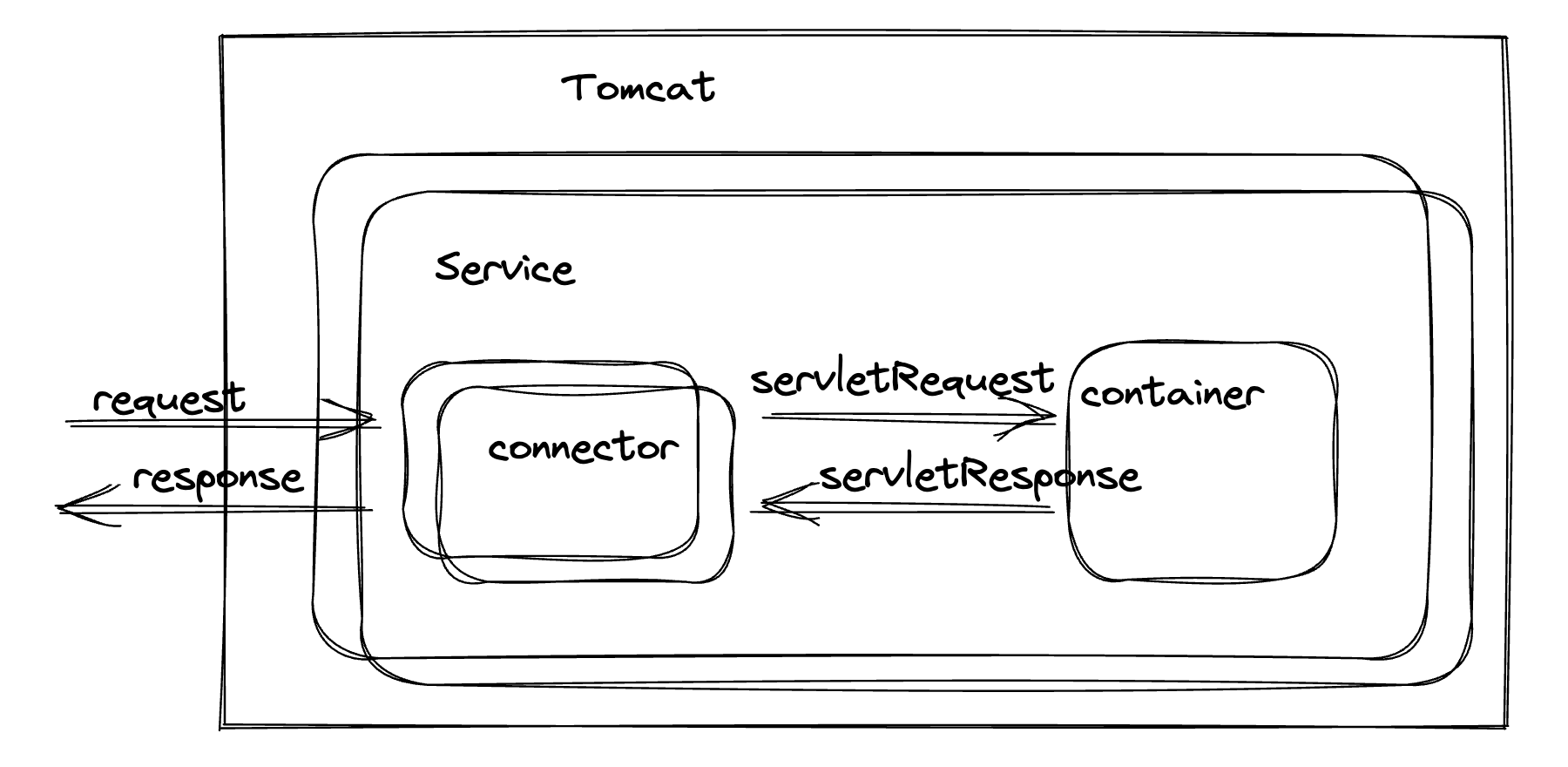
前面那一篇感觉上来的有点突兀,还是应该按照架构去慢慢解析,所以这里回归下我们整体的 Tomcat 架构,这里我们通过一个 Tomcat 的配置文件来看看

<Server>
    <Service>
        <Connector />
        <Connector />
        <Engine>
            <Host>
                <Context />
            </Host>
        </Engine>
    </Service>
</Server>

上次我们讲解了 connector,也提到了初始化的流程,在
org.springframework.boot.web.embedded.tomcat.TomcatServletWebServerFactory#getWebServer
代码中我们就能略窥一斑,

Tomcat tomcat = new Tomcat();
        File baseDir = this.baseDirectory != null ? this.baseDirectory : this.createTempDir("tomcat");
        tomcat.setBaseDir(baseDir.getAbsolutePath());
        Connector connector = new Connector(this.protocol);
        connector.setThrowOnFailure(true);
        tomcat.getService().addConnector(connector);
        this.customizeConnector(connector);
        tomcat.setConnector(connector);
        tomcat.getHost().setAutoDeploy(false);
        this.configureEngine(tomcat.getEngine());

这里的 connector 是在 service 中的,而
tomcat.getService().addConnector(connector); 这一行
具体来看下

public Service getService() {
        return getServer().findServices()[0];
    }

又调用了,org.apache.catalina.startup.Tomcat#getServer

public Server getServer() {

        if (server != null) {
            return server;
        }

        System.setProperty("catalina.useNaming", "false");

        server = new StandardServer();

        initBaseDir();

        // Set configuration source
        ConfigFileLoader.setSource(new CatalinaBaseConfigurationSource(new File(basedir), null));

        server.setPort( -1 );

        Service service = new StandardService();
        service.setName("Tomcat");
        server.addService(service);
        return server;
    }

可以看到,先 new 了 StandardServer,再 new 了 StandardService,可以理解为创建 Server 后具体是由 service 进行服务,
而在 service 中就是上面的配置文件里显示的,service 包含了 connector,可以是多个connector,负责接入,具体内容可以参看上一篇
而后是 Engine,Engine 的关系是一个 Service 有一个 Engine,Engine 负责处理真正的逻辑,

public Engine getEngine() {
        Service service = getServer().findServices()[0];
        if (service.getContainer() != null) {
            return service.getContainer();
        }
        Engine engine = new StandardEngine();
        engine.setName( "Tomcat" );
        engine.setDefaultHost(hostname);
        engine.setRealm(createDefaultRealm());
        service.setContainer(engine);
        return engine;
    }

Engine 一般默认我们初始化的都是 StandardEngine,包括前面的 StandardServer 和StandardService,
而对于 host 来说,Engine 中可以包含多个 host,也就是可以处理多个虚拟主机的业务逻辑,

public Host getHost() {
        Engine engine = getEngine();
        if (engine.findChildren().length > 0) {
            return (Host) engine.findChildren()[0];
        }

        Host host = new StandardHost();
        host.setName(hostname);
        getEngine().addChild(host);
        return host;
    }

tomcat的特点也都是常规的懒加载,在 get 的第一次请求里进行初始化,这边同样创建了 StandardHost,对于可以有多个的 host,在 Engine 中添加也变成了addChild,而对于常规的 Tomcat 来说,往下一层就是 context 了,这个可以支持多个 web 应用,所以也是可以添加多个 context,但我这边以 springboot 嵌入的 Tomcat 举例,他是内嵌的 context

protected void prepareContext(Host host, ServletContextInitializer[] initializers) {
        File documentRoot = this.getValidDocumentRoot();
        TomcatEmbeddedContext context = new TomcatEmbeddedContext();
        if (documentRoot != null) {
            context.setResources(new LoaderHidingResourceRoot(context));
        }

        context.setName(this.getContextPath());
        context.setDisplayName(this.getDisplayName());
        context.setPath(this.getContextPath());
        File docBase = documentRoot != null ? documentRoot : this.createTempDir("tomcat-docbase");
        context.setDocBase(docBase.getAbsolutePath());
        context.addLifecycleListener(new Tomcat.FixContextListener());
        context.setParentClassLoader(this.resourceLoader != null ? this.resourceLoader.getClassLoader() : ClassUtils.getDefaultClassLoader());
        this.resetDefaultLocaleMapping(context);
        this.addLocaleMappings(context);

        try {
            context.setCreateUploadTargets(true);
        } catch (NoSuchMethodError var8) {
        }

        this.configureTldPatterns(context);
        WebappLoader loader = new WebappLoader();
        loader.setLoaderClass(TomcatEmbeddedWebappClassLoader.class.getName());
        loader.setDelegate(true);
        context.setLoader(loader);
        if (this.isRegisterDefaultServlet()) {
            this.addDefaultServlet(context);
        }

        if (this.shouldRegisterJspServlet()) {
            this.addJspServlet(context);
            this.addJasperInitializer(context);
        }

        context.addLifecycleListener(new StaticResourceConfigurer(context));
        ServletContextInitializer[] initializersToUse = this.mergeInitializers(initializers);
        host.addChild(context);
        this.configureContext(context, initializersToUse);
        this.postProcessContext(context);
    }

是一个 TomcatEmbeddedContext,这一点比较特殊,希望这样会有个一个大致的概念。

tomcat的主体架构里,connector 作为核心的连接器

这也是个架构的优化,将连接跟请求处理分开,可以适配各种连接协议
连接器的初始化逻辑,是在初始化 WebServer 的时候调用
org.springframework.boot.web.embedded.tomcat.TomcatServletWebServerFactory#getWebServer

public WebServer getWebServer(ServletContextInitializer... initializers) {
        if (this.disableMBeanRegistry) {
            Registry.disableRegistry();
        }

        Tomcat tomcat = new Tomcat();
        File baseDir = this.baseDirectory != null ? this.baseDirectory : this.createTempDir("tomcat");
        tomcat.setBaseDir(baseDir.getAbsolutePath());
        // 这里就是创建 Connector
        Connector connector = new Connector(this.protocol);
        connector.setThrowOnFailure(true);
        tomcat.getService().addConnector(connector);
        this.customizeConnector(connector);
        tomcat.setConnector(connector);

而 connector 中最重要的就是 ProtocolHandler ,初始化代码中
org.apache.catalina.connector.Connector#Connector(java.lang.String)

public Connector(String protocol) {
        boolean apr = AprStatus.getUseAprConnector() && AprStatus.isInstanceCreated()
                && AprLifecycleListener.isAprAvailable();
        ProtocolHandler p = null;
        try {
            p = ProtocolHandler.create(protocol, apr);
        } catch (Exception e) {
            log.error(sm.getString(
                    "coyoteConnector.protocolHandlerInstantiationFailed"), e);
        }
        if (p != null) {
            protocolHandler = p;
            protocolHandlerClassName = protocolHandler.getClass().getName();
        } else {
            protocolHandler = null;
            protocolHandlerClassName = protocol;
        }
        // Default for Connector depends on this system property
        setThrowOnFailure(Boolean.getBoolean("org.apache.catalina.startup.EXIT_ON_INIT_FAILURE"));
    }

这里就调用了
org.apache.coyote.ProtocolHandler#create
根据协议来生成对应的,我们这里默认就是
org.apache.coyote.http11.Http11NioProtocol

public static ProtocolHandler create(String protocol, boolean apr)
            throws ClassNotFoundException, InstantiationException, IllegalAccessException,
            IllegalArgumentException, InvocationTargetException, NoSuchMethodException, SecurityException {
        if (protocol == null || "HTTP/1.1".equals(protocol)
                || (!apr && org.apache.coyote.http11.Http11NioProtocol.class.getName().equals(protocol))
                || (apr && org.apache.coyote.http11.Http11AprProtocol.class.getName().equals(protocol))) {
            if (apr) {
                return new org.apache.coyote.http11.Http11AprProtocol();
            } else {
                return new org.apache.coyote.http11.Http11NioProtocol();
            }
        } else if ("AJP/1.3".equals(protocol)
                || (!apr && org.apache.coyote.ajp.AjpNioProtocol.class.getName().equals(protocol))
                || (apr && org.apache.coyote.ajp.AjpAprProtocol.class.getName().equals(protocol))) {
            if (apr) {
                return new org.apache.coyote.ajp.AjpAprProtocol();
            } else {
                return new org.apache.coyote.ajp.AjpNioProtocol();
            }
        } else {
            // Instantiate protocol handler
            Class<?> clazz = Class.forName(protocol);
            return (ProtocolHandler) clazz.getConstructor().newInstance();
        }
    }

而这个初始化就主要做的是初始化 EndPoint

public Http11NioProtocol() {
    super(new NioEndpoint());
}

这个调用父类的方法是调用的
org.apache.coyote.http11.AbstractHttp11Protocol#AbstractHttp11Protocol

public AbstractHttp11Protocol(AbstractEndpoint<S,?> endpoint) {
        super(endpoint);
        setConnectionTimeout(Constants.DEFAULT_CONNECTION_TIMEOUT);
        ConnectionHandler<S> cHandler = new ConnectionHandler<>(this);
        setHandler(cHandler);
        getEndpoint().setHandler(cHandler);
    }

而后在 Tomcat 启动后,在启动 connector 的时候
是在StandardService 添加 connector 时,启动了 connector
org.apache.catalina.core.StandardService#addConnector

@Override
    public void addConnector(Connector connector) {

        synchronized (connectorsLock) {
            connector.setService(this);
            Connector results[] = new Connector[connectors.length + 1];
            System.arraycopy(connectors, 0, results, 0, connectors.length);
            results[connectors.length] = connector;
            connectors = results;
        }

        try {
            if (getState().isAvailable()) {
                connector.start();
            }
        } catch (LifecycleException e) {
            throw new IllegalArgumentException(
                    sm.getString("standardService.connector.startFailed", connector), e);
        }

        // Report this property change to interested listeners
        support.firePropertyChange("connector", null, connector);
    }

而后就会调用到 ConnectorinitInternal 方法
org.apache.catalina.connector.Connector#initInternal

@Override
    protected void initInternal() throws LifecycleException {

        super.initInternal();

        if (protocolHandler == null) {
            throw new LifecycleException(
                    sm.getString("coyoteConnector.protocolHandlerInstantiationFailed"));
        }

        // Initialize adapter
        adapter = new CoyoteAdapter(this);
        protocolHandler.setAdapter(adapter);
        if (service != null) {
            protocolHandler.setUtilityExecutor(service.getServer().getUtilityExecutor());
        }

        // Make sure parseBodyMethodsSet has a default
        if (null == parseBodyMethodsSet) {
            setParseBodyMethods(getParseBodyMethods());
        }

        if (protocolHandler.isAprRequired() && !AprStatus.isInstanceCreated()) {
            throw new LifecycleException(sm.getString("coyoteConnector.protocolHandlerNoAprListener",
                    getProtocolHandlerClassName()));
        }
        if (protocolHandler.isAprRequired() && !AprStatus.isAprAvailable()) {
            throw new LifecycleException(sm.getString("coyoteConnector.protocolHandlerNoAprLibrary",
                    getProtocolHandlerClassName()));
        }
        if (AprStatus.isAprAvailable() && AprStatus.getUseOpenSSL() &&
                protocolHandler instanceof AbstractHttp11JsseProtocol) {
            AbstractHttp11JsseProtocol<?> jsseProtocolHandler =
                    (AbstractHttp11JsseProtocol<?>) protocolHandler;
            if (jsseProtocolHandler.isSSLEnabled() &&
                    jsseProtocolHandler.getSslImplementationName() == null) {
                // OpenSSL is compatible with the JSSE configuration, so use it if APR is available
                jsseProtocolHandler.setSslImplementationName(OpenSSLImplementation.class.getName());
            }
        }

        try {
            protocolHandler.init();
        } catch (Exception e) {
            throw new LifecycleException(
                    sm.getString("coyoteConnector.protocolHandlerInitializationFailed"), e);
        }
    }

这里继续往下走就是 protocolHandler 的 init 方法

@Override
public void init() throws Exception {
    if (getLog().isInfoEnabled()) {
        getLog().info(sm.getString("abstractProtocolHandler.init", getName()));
        logPortOffset();
    }

    if (oname == null) {
        // Component not pre-registered so register it
        oname = createObjectName();
        if (oname != null) {
            Registry.getRegistry(null, null).registerComponent(this, oname, null);
        }
    }

    if (this.domain != null) {
        ObjectName rgOname = new ObjectName(domain + ":type=GlobalRequestProcessor,name=" + getName());
        this.rgOname = rgOname;
        Registry.getRegistry(null, null).registerComponent(
                getHandler().getGlobal(), rgOname, null);
    }

    String endpointName = getName();
    endpoint.setName(endpointName.substring(1, endpointName.length()-1));
    endpoint.setDomain(domain);

    endpoint.init();
}

看一下继承关系

然后就看到这里调用了 endpoint.init() ,走的也是父类的初始化方法,
org.apache.tomcat.util.net.AbstractEndpoint#init

public final void init() throws Exception {
    if (bindOnInit) {
        bindWithCleanup();
        bindState = BindState.BOUND_ON_INIT;
    }
    if (this.domain != null) {
        // Register endpoint (as ThreadPool - historical name)
        oname = new ObjectName(domain + ":type=ThreadPool,name=\"" + getName() + "\"");
        Registry.getRegistry(null, null).registerComponent(this, oname, null);

        ObjectName socketPropertiesOname = new ObjectName(domain +
                ":type=SocketProperties,name=\"" + getName() + "\"");
        socketProperties.setObjectName(socketPropertiesOname);
        Registry.getRegistry(null, null).registerComponent(socketProperties, socketPropertiesOname, null);

        for (SSLHostConfig sslHostConfig : findSslHostConfigs()) {
            registerJmx(sslHostConfig);
        }
    }
}

然后接着调用了
org.apache.tomcat.util.net.AbstractEndpoint#bindWithCleanup

private void bindWithCleanup() throws Exception {
    try {
        bind();
    } catch (Throwable t) {
        // Ensure open sockets etc. are cleaned up if something goes
        // wrong during bind
        ExceptionUtils.handleThrowable(t);
        unbind();
        throw t;
    }
}

这里的 bind 方法调用的是
org.apache.tomcat.util.net.NioEndpoint#bind

@Override
public void bind() throws Exception {
    initServerSocket();

    setStopLatch(new CountDownLatch(1));

    // Initialize SSL if needed
    initialiseSsl();
}

这里的 initServerSocket是后面抽出来的,方便扩展,主要就是开启 ServerSocketChannel,绑定端口

// Separated out to make it easier for folks that extend NioEndpoint to
    // implement custom [server]sockets
    protected void initServerSocket() throws Exception {
        if (getUseInheritedChannel()) {
            // Retrieve the channel provided by the OS
            Channel ic = System.inheritedChannel();
            if (ic instanceof ServerSocketChannel) {
                serverSock = (ServerSocketChannel) ic;
            }
            if (serverSock == null) {
                throw new IllegalArgumentException(sm.getString("endpoint.init.bind.inherited"));
            }
        } else if (getUnixDomainSocketPath() != null) {
            SocketAddress sa = JreCompat.getInstance().getUnixDomainSocketAddress(getUnixDomainSocketPath());
            serverSock = JreCompat.getInstance().openUnixDomainServerSocketChannel();
            serverSock.bind(sa, getAcceptCount());
            if (getUnixDomainSocketPathPermissions() != null) {
                Path path = Paths.get(getUnixDomainSocketPath());
                Set<PosixFilePermission> permissions =
                        PosixFilePermissions.fromString(getUnixDomainSocketPathPermissions());
                if (path.getFileSystem().supportedFileAttributeViews().contains("posix")) {
                    FileAttribute<Set<PosixFilePermission>> attrs = PosixFilePermissions.asFileAttribute(permissions);
                    Files.setAttribute(path, attrs.name(), attrs.value());
                } else {
                    java.io.File file = path.toFile();
                    if (permissions.contains(PosixFilePermission.OTHERS_READ) && !file.setReadable(true, false)) {
                        log.warn(sm.getString("endpoint.nio.perms.readFail", file.getPath()));
                    }
                    if (permissions.contains(PosixFilePermission.OTHERS_WRITE) && !file.setWritable(true, false)) {
                        log.warn(sm.getString("endpoint.nio.perms.writeFail", file.getPath()));
                    }
                }
            }
        } else {
            serverSock = ServerSocketChannel.open();
            socketProperties.setProperties(serverSock.socket());
            InetSocketAddress addr = new InetSocketAddress(getAddress(), getPortWithOffset());
            serverSock.bind(addr, getAcceptCount());
        }
        serverSock.configureBlocking(true); //mimic APR behavior
    }

接着我们来看下 start 方法,这里多数是复用的 父类的方法
org.apache.tomcat.util.net.AbstractEndpoint#start

public final void start() throws Exception {
        if (bindState == BindState.UNBOUND) {
            bindWithCleanup();
            bindState = BindState.BOUND_ON_START;
        }
        startInternal();
    }

startInternal 才是 NioEndPoint 中的处理

/**
 * Start the NIO endpoint, creating acceptor, poller threads.
 */
@Override
public void startInternal() throws Exception {

    if (!running) {
        running = true;
        paused = false;

        if (socketProperties.getProcessorCache() != 0) {
            processorCache = new SynchronizedStack<>(SynchronizedStack.DEFAULT_SIZE,
                    socketProperties.getProcessorCache());
        }
        if (socketProperties.getEventCache() != 0) {
            eventCache = new SynchronizedStack<>(SynchronizedStack.DEFAULT_SIZE,
                    socketProperties.getEventCache());
        }
        if (socketProperties.getBufferPool() != 0) {
            nioChannels = new SynchronizedStack<>(SynchronizedStack.DEFAULT_SIZE,
                    socketProperties.getBufferPool());
        }

        // Create worker collection
        if (getExecutor() == null) {
            createExecutor();
        }

        initializeConnectionLatch();

        // Start poller thread
        poller = new Poller();
        Thread pollerThread = new Thread(poller, getName() + "-Poller");
        pollerThread.setPriority(threadPriority);
        pollerThread.setDaemon(true);
        pollerThread.start();

        startAcceptorThread();
    }
}

上面是启动了一个 Poller 线程,在startAcceptorThread 里是启动了 acceptor

protected void startAcceptorThread() {
        acceptor = new Acceptor<>(this);
        String threadName = getName() + "-Acceptor";
        acceptor.setThreadName(threadName);
        Thread t = new Thread(acceptor, threadName);
        t.setPriority(getAcceptorThreadPriority());
        t.setDaemon(getDaemon());
        t.start();
    }

启动后运行的代码

@Override
    public void run() {

        int errorDelay = 0;

        try {
            // Loop until we receive a shutdown command
            while (!stopCalled) {

                // Loop if endpoint is paused
                while (endpoint.isPaused() && !stopCalled) {
                    state = AcceptorState.PAUSED;
                    try {
                        Thread.sleep(50);
                    } catch (InterruptedException e) {
                        // Ignore
                    }
                }

                if (stopCalled) {
                    break;
                }
                state = AcceptorState.RUNNING;

                try {
                    //if we have reached max connections, wait
                    endpoint.countUpOrAwaitConnection();

                    // Endpoint might have been paused while waiting for latch
                    // If that is the case, don't accept new connections
                    if (endpoint.isPaused()) {
                        continue;
                    }

                    U socket = null;
                    try {
                        // Accept the next incoming connection from the server
                        // socket
                        socket = endpoint.serverSocketAccept();
                    } catch (Exception ioe) {
                        // We didn't get a socket
                        endpoint.countDownConnection();
                        if (endpoint.isRunning()) {
                            // Introduce delay if necessary
                            errorDelay = handleExceptionWithDelay(errorDelay);
                            // re-throw
                            throw ioe;
                        } else {
                            break;
                        }
                    }
                    // Successful accept, reset the error delay
                    errorDelay = 0;

                    // Configure the socket
                    if (!stopCalled && !endpoint.isPaused()) {
                        // setSocketOptions() will hand the socket off to
                        // an appropriate processor if successful
                        if (!endpoint.setSocketOptions(socket)) {
                            endpoint.closeSocket(socket);
                        }
                    } else {
                        endpoint.destroySocket(socket);
                    }
                } catch (Throwable t) {
                    ExceptionUtils.handleThrowable(t);
                    String msg = sm.getString("endpoint.accept.fail");
                    // APR specific.
                    // Could push this down but not sure it is worth the trouble.
                    if (t instanceof Error) {
                        Error e = (Error) t;
                        if (e.getError() == 233) {
                            // Not an error on HP-UX so log as a warning
                            // so it can be filtered out on that platform
                            // See bug 50273
                            log.warn(msg, t);
                        } else {
                            log.error(msg, t);
                        }
                    } else {
                            log.error(msg, t);
                    }
                }
            }
        } finally {
            stopLatch.countDown();
        }
        state = AcceptorState.ENDED;
    }

这行socket = endpoint.serverSocketAccept();是 accept 等待线程进来,进来以后调用

@Override
    protected boolean setSocketOptions(SocketChannel socket) {
        NioSocketWrapper socketWrapper = null;
        try {
            // Allocate channel and wrapper
            NioChannel channel = null;
            if (nioChannels != null) {
                channel = nioChannels.pop();
            }
            if (channel == null) {
                SocketBufferHandler bufhandler = new SocketBufferHandler(
                        socketProperties.getAppReadBufSize(),
                        socketProperties.getAppWriteBufSize(),
                        socketProperties.getDirectBuffer());
                if (isSSLEnabled()) {
                    channel = new SecureNioChannel(bufhandler, this);
                } else {
                    channel = new NioChannel(bufhandler);
                }
            }
            NioSocketWrapper newWrapper = new NioSocketWrapper(channel, this);
            channel.reset(socket, newWrapper);
            connections.put(socket, newWrapper);
            socketWrapper = newWrapper;

            // Set socket properties
            // Disable blocking, polling will be used
            socket.configureBlocking(false);
            if (getUnixDomainSocketPath() == null) {
                socketProperties.setProperties(socket.socket());
            }

            socketWrapper.setReadTimeout(getConnectionTimeout());
            socketWrapper.setWriteTimeout(getConnectionTimeout());
            socketWrapper.setKeepAliveLeft(NioEndpoint.this.getMaxKeepAliveRequests());
            poller.register(socketWrapper);
            return true;
        } catch (Throwable t) {
            ExceptionUtils.handleThrowable(t);
            try {
                log.error(sm.getString("endpoint.socketOptionsError"), t);
            } catch (Throwable tt) {
                ExceptionUtils.handleThrowable(tt);
            }
            if (socketWrapper == null) {
                destroySocket(socket);
            }
        }
        // Tell to close the socket if needed
        return false;
    }

这里就是最重要的封装了 NioSocketWrapper, 然后注册到 Poller,
我们再来看 Poller 代码,注册其实是添加事件 event

public void register(final NioSocketWrapper socketWrapper) {
    socketWrapper.interestOps(SelectionKey.OP_READ);//this is what OP_REGISTER turns into.
    PollerEvent event = null;
    if (eventCache != null) {
        event = eventCache.pop();
    }
    if (event == null) {
        event = new PollerEvent(socketWrapper, OP_REGISTER);
    } else {
        event.reset(socketWrapper, OP_REGISTER);
    }
    addEvent(event);
}

然后Poller 的运行方法会处理这些 event

@Override
        public void run() {
            // Loop until destroy() is called
            while (true) {

                boolean hasEvents = false;

                try {
                    if (!close) {
                        hasEvents = events();
                        if (wakeupCounter.getAndSet(-1) > 0) {
                            // If we are here, means we have other stuff to do
                            // Do a non blocking select
                            keyCount = selector.selectNow();
                        } else {
                            keyCount = selector.select(selectorTimeout);
                        }
                        wakeupCounter.set(0);
                    }
                    if (close) {
                        events();
                        timeout(0, false);
                        try {
                            selector.close();
                        } catch (IOException ioe) {
                            log.error(sm.getString("endpoint.nio.selectorCloseFail"), ioe);
                        }
                        break;
                    }
                    // Either we timed out or we woke up, process events first
                    if (keyCount == 0) {
                        hasEvents = (hasEvents | events());
                    }
                } catch (Throwable x) {
                    ExceptionUtils.handleThrowable(x);
                    log.error(sm.getString("endpoint.nio.selectorLoopError"), x);
                    continue;
                }

                Iterator<SelectionKey> iterator =
                    keyCount > 0 ? selector.selectedKeys().iterator() : null;
                // Walk through the collection of ready keys and dispatch
                // any active event.
                while (iterator != null && iterator.hasNext()) {
                    SelectionKey sk = iterator.next();
                    iterator.remove();
                    NioSocketWrapper socketWrapper = (NioSocketWrapper) sk.attachment();
                    // Attachment may be null if another thread has called
                    // cancelledKey()
                    if (socketWrapper != null) {
                        processKey(sk, socketWrapper);
                    }
                }

                // Process timeouts
                timeout(keyCount,hasEvents);
            }

            getStopLatch().countDown();
        }

如果 events 方法返回了 true 代表有事件,就会跑到processKey(sk, socketWrapper); 来处理这个事件
而这里的 processKey 也比较复杂,

protected void processKey(SelectionKey sk, NioSocketWrapper socketWrapper) {
            try {
                if (close) {
                    cancelledKey(sk, socketWrapper);
                } else if (sk.isValid()) {
                    if (sk.isReadable() || sk.isWritable()) {
                        if (socketWrapper.getSendfileData() != null) {
                            processSendfile(sk, socketWrapper, false);
                        } else {
                            unreg(sk, socketWrapper, sk.readyOps());
                            boolean closeSocket = false;
                            // Read goes before write
                            if (sk.isReadable()) {
                                if (socketWrapper.readOperation != null) {
                                    if (!socketWrapper.readOperation.process()) {
                                        closeSocket = true;
                                    }
                                } else if (socketWrapper.readBlocking) {
                                    synchronized (socketWrapper.readLock) {
                                        socketWrapper.readBlocking = false;
                                        socketWrapper.readLock.notify();
                                    }
                                } else if (!processSocket(socketWrapper, SocketEvent.OPEN_READ, true)) {
                                    closeSocket = true;
                                }
                            }
                            if (!closeSocket && sk.isWritable()) {
                                if (socketWrapper.writeOperation != null) {
                                    if (!socketWrapper.writeOperation.process()) {
                                        closeSocket = true;
                                    }
                                } else if (socketWrapper.writeBlocking) {
                                    synchronized (socketWrapper.writeLock) {
                                        socketWrapper.writeBlocking = false;
                                        socketWrapper.writeLock.notify();
                                    }
                                } else if (!processSocket(socketWrapper, SocketEvent.OPEN_WRITE, true)) {
                                    closeSocket = true;
                                }
                            }
                            if (closeSocket) {
                                cancelledKey(sk, socketWrapper);
                            }
                        }
                    }
                } else {
                    // Invalid key
                    cancelledKey(sk, socketWrapper);
                }
            } catch (CancelledKeyException ckx) {
                cancelledKey(sk, socketWrapper);
            } catch (Throwable t) {
                ExceptionUtils.handleThrowable(t);
                log.error(sm.getString("endpoint.nio.keyProcessingError"), t);
            }
        }

正常请求回到这
else if (!processSocket(socketWrapper, SocketEvent.OPEN_READ, true))
然后调用processSocket 进行处理,

public boolean processSocket(SocketWrapperBase<S> socketWrapper,
            SocketEvent event, boolean dispatch) {
        try {
            if (socketWrapper == null) {
                return false;
            }
            SocketProcessorBase<S> sc = null;
            if (processorCache != null) {
                sc = processorCache.pop();
            }
            if (sc == null) {
                sc = createSocketProcessor(socketWrapper, event);
            } else {
                sc.reset(socketWrapper, event);
            }
            Executor executor = getExecutor();
            if (dispatch && executor != null) {
                executor.execute(sc);
            } else {
                sc.run();
            }
        } catch (RejectedExecutionException ree) {
            getLog().warn(sm.getString("endpoint.executor.fail", socketWrapper) , ree);
            return false;
        } catch (Throwable t) {
            ExceptionUtils.handleThrowable(t);
            // This means we got an OOM or similar creating a thread, or that
            // the pool and its queue are full
            getLog().error(sm.getString("endpoint.process.fail"), t);
            return false;
        }
        return true;
    }

这里就会调用 createSocketProcessor 进行处理了,不过这是下一篇的内容了。
首先是跳转,应该说设置状态,其中跳转是其中一个状态,

@RequestMapping(value = "request1", method = RequestMethod.GET)
    public void request1(HttpServletRequest request, HttpServletResponse response) {
        response.setStatus(HttpServletResponse.SC_OK);
    }

200 状态就很简单,如果想做跳转可以使用 302 并设置 location

@RequestMapping(value = "request2", method = RequestMethod.GET)
public void request2(HttpServletRequest request, HttpServletResponse response) {
    response.setHeader("Location", "https://baidu.com");
    response.setStatus(HttpServletResponse.SC_MOVED_TEMPORARILY);
}

这里如果设置了 302,但没设置跳转 location,就是 302 found

int SC_MOVED_TEMPORARILY = 302;
int SC_FOUND = 302;

而如果是 301 跳转,代表原地址不可用了,永久跳转

@RequestMapping(value = "request3", method = RequestMethod.GET)
    public void request3(HttpServletRequest request, HttpServletResponse response) {
        response.setHeader("Location", "https://baidu.com");
        response.setStatus(HttpServletResponse.SC_MOVED_PERMANENTLY);
    }

另一个问题是设置 cookie

@RequestMapping(value = "request4", method = RequestMethod.GET)
    public void request4(HttpServletRequest request, HttpServletResponse response) {
        Cookie cookie = new Cookie("a", "b");
        response.addCookie(cookie);
        response.setStatus(HttpServletResponse.SC_OK);
    }

这样的设置就能成功设定 cookie,而随着目前的浏览器 cookie 策略,如果要跳转后设置的话,估计是会越来越难,包括

response.addHeader("Set-Cookie", "a=b; domain=baidu.com; SameSite=none;Secure");

这样的方式也没法实现。

Tomcat 会把请求委托到
org.springframework.web.servlet.DispatcherServlet#doService

protected void doService(HttpServletRequest request, HttpServletResponse response) throws Exception {
		logRequest(request);

        // 省略前面的代码
		try {
			doDispatch(request, response);
		}

然后就是调用
org.springframework.web.servlet.DispatcherServlet#doDispatch

protected void doDispatch(HttpServletRequest request, HttpServletResponse response) throws Exception {

	try {
		ModelAndView mv = null;
		Exception dispatchException = null;

		try {
			processedRequest = checkMultipart(request);
			multipartRequestParsed = (processedRequest != request);

               // 去获取处理器
			// Determine handler for the current request.
			mappedHandler = getHandler(processedRequest);
			if (mappedHandler == null) {
				noHandlerFound(processedRequest, response);
				return;
			}

			// Determine handler adapter for the current request.
			HandlerAdapter ha = getHandlerAdapter(mappedHandler.getHandler());

			// Process last-modified header, if supported by the handler.
			String method = request.getMethod();
			boolean isGet = HttpMethod.GET.matches(method);
			if (isGet || HttpMethod.HEAD.matches(method)) {
				long lastModified = ha.getLastModified(request, mappedHandler.getHandler());
				if (new ServletWebRequest(request, response).checkNotModified(lastModified) && isGet) {
					return;
				}
			}

			if (!mappedHandler.applyPreHandle(processedRequest, response)) {
				return;
			}

			// Actually invoke the handler.
			mv = ha.handle(processedRequest, response, mappedHandler.getHandler());

看下这里的逻辑

@Nullable
protected HandlerExecutionChain getHandler(HttpServletRequest request) throws Exception {
	if (this.handlerMappings != null) {
		for (HandlerMapping mapping : this.handlerMappings) {
			HandlerExecutionChain handler = mapping.getHandler(request);
			if (handler != null) {
				return handler;
			}
		}
	}
	return null;
}

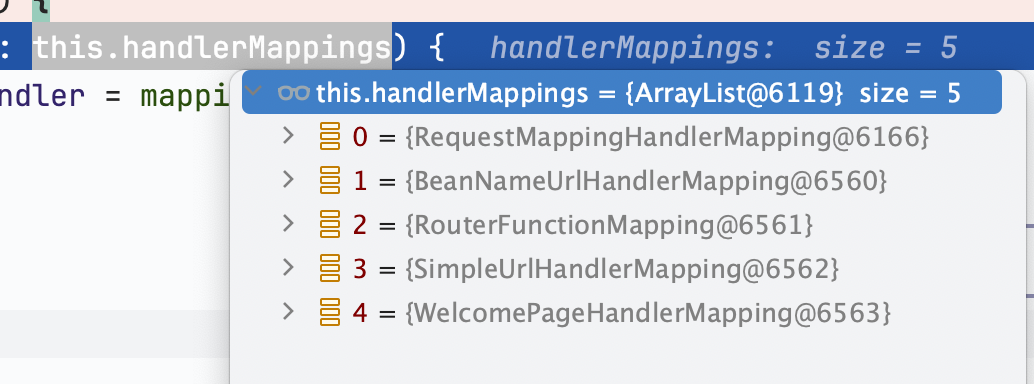
可以看到有这些 HandlerMapping

而这里面就是前面提到过的
org.springframework.web.servlet.mvc.method.annotation.RequestMappingHandlerMapping
从这就能找到具体的 Handler
com.nicksxs.spbdemo.controller.DemoController#test()
这就是我简单的示例代码

@RequestMapping(value = "/test", method = RequestMethod.GET)
@ResponseBody
public DemoResponse test() {
    String item = "{\"id\": 1, \"name\": \"nick\"}";
    ParserConfig parserConfig = ParserConfig.getGlobalInstance();
    parserConfig.propertyNamingStrategy = PropertyNamingStrategy.SnakeCase;
    DemoResponse response = JSON.parseObject(item, DemoResponse.class, parserConfig);
    return response;
}

下一步是再获取处理器的适配器,
org.springframework.web.servlet.mvc.method.annotation.RequestMappingHandlerAdapter

protected HandlerAdapter getHandlerAdapter(Object handler) throws ServletException {
		if (this.handlerAdapters != null) {
			for (HandlerAdapter adapter : this.handlerAdapters) {
				if (adapter.supports(handler)) {
					return adapter;
				}
			}
		}
		throw new ServletException("No adapter for handler [" + handler +
				"]: The DispatcherServlet configuration needs to include a HandlerAdapter that supports this handler");
	}

正好这个适配器是调用的父类的 supports 方法

@Override
public final boolean supports(Object handler) {
	return (handler instanceof HandlerMethod && supportsInternal((HandlerMethod) handler));
}

而我这个com.nicksxs.spbdemo.controller.DemoController#test()
就是个包装好的 HandlerMethod
然后就是调用 hahandle 方法,也是通过模板方法,实际调用的是
org.springframework.web.servlet.mvc.method.AbstractHandlerMethodAdapter#handle

@Override
@Nullable
public final ModelAndView handle(HttpServletRequest request, HttpServletResponse response, Object handler)
		throws Exception {

	return handleInternal(request, response, (HandlerMethod) handler);
}

然后调用
org.springframework.web.servlet.mvc.method.annotation.RequestMappingHandlerAdapter#handleInternal

@Override
	protected ModelAndView handleInternal(HttpServletRequest request,
			HttpServletResponse response, HandlerMethod handlerMethod) throws Exception {

		ModelAndView mav;
		checkRequest(request);

		// Execute invokeHandlerMethod in synchronized block if required.
		if (this.synchronizeOnSession) {
			HttpSession session = request.getSession(false);
			if (session != null) {
				Object mutex = WebUtils.getSessionMutex(session);
				synchronized (mutex) {
					mav = invokeHandlerMethod(request, response, handlerMethod);
				}
			}
			else {
				// No HttpSession available -> no mutex necessary
				mav = invokeHandlerMethod(request, response, handlerMethod);
			}
		}
		else {
            // 是否要锁定 session,否则走到这
			// No synchronization on session demanded at all...
			mav = invokeHandlerMethod(request, response, handlerMethod);
		}

继续调用
org.springframework.web.servlet.mvc.method.annotation.RequestMappingHandlerAdapter#invokeHandlerMethod

@Nullable
	protected ModelAndView invokeHandlerMethod(HttpServletRequest request,
			HttpServletResponse response, HandlerMethod handlerMethod) throws Exception {

		ServletWebRequest webRequest = new ServletWebRequest(request, response);
		try {
			WebDataBinderFactory binderFactory = getDataBinderFactory(handlerMethod);
			ModelFactory modelFactory = getModelFactory(handlerMethod, binderFactory);

            // 包装调用方法,
			ServletInvocableHandlerMethod invocableMethod = createInvocableHandlerMethod(handlerMethod);
			// 省略一部分非本次关注核心代码
            // 然后是调用到这
			invocableMethod.invokeAndHandle(webRequest, mavContainer);
			if (asyncManager.isConcurrentHandlingStarted()) {
				return null;
			}

			return getModelAndView(mavContainer, modelFactory, webRequest);
		}
		finally {
			webRequest.requestCompleted();
		}
	}

稍微再看一眼
第一步是
org.springframework.web.servlet.mvc.method.annotation.RequestMappingHandlerAdapter#createInvocableHandlerMethod

protected ServletInvocableHandlerMethod createInvocableHandlerMethod(HandlerMethod handlerMethod) {
	return new ServletInvocableHandlerMethod(handlerMethod);
}

第二步是
org.springframework.web.servlet.mvc.method.annotation.ServletInvocableHandlerMethod#ServletInvocableHandlerMethod(org.springframework.web.method.HandlerMethod)

   public ServletInvocableHandlerMethod(HandlerMethod handlerMethod) {
	super(handlerMethod);
}

第三步是
org.springframework.web.method.support.InvocableHandlerMethod#InvocableHandlerMethod(org.springframework.web.method.HandlerMethod)

   public InvocableHandlerMethod(HandlerMethod handlerMethod) {
	super(handlerMethod);
}

第四步是
org.springframework.web.method.HandlerMethod#HandlerMethod(org.springframework.web.method.HandlerMethod)

protected HandlerMethod(HandlerMethod handlerMethod) {
	Assert.notNull(handlerMethod, "HandlerMethod is required");
	this.bean = handlerMethod.bean;
	this.beanFactory = handlerMethod.beanFactory;
	this.beanType = handlerMethod.beanType;
	this.method = handlerMethod.method;
	this.bridgedMethod = handlerMethod.bridgedMethod;
	this.parameters = handlerMethod.parameters;
	this.responseStatus = handlerMethod.responseStatus;
	this.responseStatusReason = handlerMethod.responseStatusReason;
	this.description = handlerMethod.description;
	this.resolvedFromHandlerMethod = handlerMethod.resolvedFromHandlerMethod;
}

这是个继承关系,一直调用到最顶层的父类的构造方法,其实就是拷贝,然后继续调用
org.springframework.web.servlet.mvc.method.annotation.ServletInvocableHandlerMethod#invokeAndHandle

public void invokeAndHandle(ServletWebRequest webRequest, ModelAndViewContainer mavContainer,
			Object... providedArgs) throws Exception {

        // 调用请求
		Object returnValue = invokeForRequest(webRequest, mavContainer, providedArgs);
		// 稍微忽略下后面的代码
	}

继续调用
org.springframework.web.method.support.InvocableHandlerMethod#invokeForRequest

@Nullable
public Object invokeForRequest(NativeWebRequest request, @Nullable ModelAndViewContainer mavContainer,
		Object... providedArgs) throws Exception {

	Object[] args = getMethodArgumentValues(request, mavContainer, providedArgs);
	if (logger.isTraceEnabled()) {
		logger.trace("Arguments: " + Arrays.toString(args));
	}
	return doInvoke(args);
}

来到了最核心处
org.springframework.web.method.support.InvocableHandlerMethod#doInvoke

@Nullable
protected Object doInvoke(Object... args) throws Exception {
	Method method = getBridgedMethod();
	ReflectionUtils.makeAccessible(method);
	try {
		if (KotlinDetector.isSuspendingFunction(method)) {
			return CoroutinesUtils.invokeSuspendingFunction(method, getBean(), args);
		}
           // 会走到这里,获取到 bean,而这个 bean 就是前面构造方法里赋值的,最开始被放在 handler 里面,然后调用方法
		return method.invoke(getBean(), args);
	}
0%