What hurts more, the pain of hard work or the pain of regret?

0%

这一篇不再是数据结构介绍了,大致的数据结构基本都介绍了,这一篇主要是查漏补缺,或者说讲一些重要且基本的概念,也可能是经常被忽略的,很多讲 redis 的系列文章可能都会忽略,学习 redis 的时候也会,因为觉得源码学习就是讲主要的数据结构和“算法”学习了就好了。
redis 的主要应用就是拿来作为高性能的缓存,那么缓存一般有些啥需要注意的,首先是访问速度,如果取得跟数据库一样快,那就没什么存在的意义,第二个是缓存的字面意思,我只是为了让数据读取快一些,通常大部分的场景这个是需要更新过期的,这里就把我要讲的第一点引出来了(真累,

redis过期策略

redis 是如何过期缓存的,可以猜测下,最无脑的就是每个设置了过期时间的 key 都设个定时器,过期了就删除,这种显然消耗太大,清理地最及时,还有的就是 redis 正在采用的懒汉清理策略和定期清理
懒汉策略就是在使用的时候去检查缓存是否过期,比如 get 操作时,先判断下这个 key 是否已经过期了,如果过期了就删掉,并且返回空,如果没过期则正常返回
主要代码是

1
2
3
4
5
6
7
8
9
10
11
12
13
14
15
16
17
18
19
20
21
22
23
24
25
26
27
28
29
30
31
32
33
34
35
36
37
38
39
40
41
42
43
44
45
46
47
48
49
50
51
52
53
54
55
56
57
58
59
60
61
62
63
64
65
66
67
68
69
70
71
72
73
74
75
76
77
78
79
80
81
82
83
84
85
86
87
88
89
90
91
92
/* This function is called when we are going to perform some operation
* in a given key, but such key may be already logically expired even if
* it still exists in the database. The main way this function is called
* is via lookupKey*() family of functions.
*
* The behavior of the function depends on the replication role of the
* instance, because slave instances do not expire keys, they wait
* for DELs from the master for consistency matters. However even
* slaves will try to have a coherent return value for the function,
* so that read commands executed in the slave side will be able to
* behave like if the key is expired even if still present (because the
* master has yet to propagate the DEL).
*
* In masters as a side effect of finding a key which is expired, such
* key will be evicted from the database. Also this may trigger the
* propagation of a DEL/UNLINK command in AOF / replication stream.
*
* The return value of the function is 0 if the key is still valid,
* otherwise the function returns 1 if the key is expired. */
int expireIfNeeded(redisDb *db, robj *key) {
if (!keyIsExpired(db,key)) return 0;

/* If we are running in the context of a slave, instead of
* evicting the expired key from the database, we return ASAP:
* the slave key expiration is controlled by the master that will
* send us synthesized DEL operations for expired keys.
*
* Still we try to return the right information to the caller,
* that is, 0 if we think the key should be still valid, 1 if
* we think the key is expired at this time. */
if (server.masterhost != NULL) return 1;

/* Delete the key */
server.stat_expiredkeys++;
propagateExpire(db,key,server.lazyfree_lazy_expire);
notifyKeyspaceEvent(NOTIFY_EXPIRED,
"expired",key,db->id);
return server.lazyfree_lazy_expire ? dbAsyncDelete(db,key) :
dbSyncDelete(db,key);
}

/* Check if the key is expired. */
int keyIsExpired(redisDb *db, robj *key) {
mstime_t when = getExpire(db,key);
mstime_t now;

if (when < 0) return 0; /* No expire for this key */

/* Don't expire anything while loading. It will be done later. */
if (server.loading) return 0;

/* If we are in the context of a Lua script, we pretend that time is
* blocked to when the Lua script started. This way a key can expire
* only the first time it is accessed and not in the middle of the
* script execution, making propagation to slaves / AOF consistent.
* See issue #1525 on Github for more information. */
if (server.lua_caller) {
now = server.lua_time_start;
}
/* If we are in the middle of a command execution, we still want to use
* a reference time that does not change: in that case we just use the
* cached time, that we update before each call in the call() function.
* This way we avoid that commands such as RPOPLPUSH or similar, that
* may re-open the same key multiple times, can invalidate an already
* open object in a next call, if the next call will see the key expired,
* while the first did not. */
else if (server.fixed_time_expire > 0) {
now = server.mstime;
}
/* For the other cases, we want to use the most fresh time we have. */
else {
now = mstime();
}

/* The key expired if the current (virtual or real) time is greater
* than the expire time of the key. */
return now > when;
}
/* Return the expire time of the specified key, or -1 if no expire
* is associated with this key (i.e. the key is non volatile) */
long long getExpire(redisDb *db, robj *key) {
dictEntry *de;

/* No expire? return ASAP */
if (dictSize(db->expires) == 0 ||
(de = dictFind(db->expires,key->ptr)) == NULL) return -1;

/* The entry was found in the expire dict, this means it should also
* be present in the main dict (safety check). */
serverAssertWithInfo(NULL,key,dictFind(db->dict,key->ptr) != NULL);
return dictGetSignedIntegerVal(de);
}

这里有几点要注意的,第一是当惰性删除时会根据lazyfree_lazy_expire这个参数去判断是执行同步删除还是异步删除,另外一点是对于 slave,是不需要执行的,因为会在 master 过期时向 slave 发送 del 指令。
光采用这个策略会有什么问题呢,假如一些key 一直未被访问,那这些 key 就不会过期了,导致一直被占用着内存,所以 redis 采取了懒汉式过期加定期过期策略,定期策略是怎么执行的呢

1
2
3
4
5
6
7
8
9
10
11
12
13
14
15
16
17
18
19
20
21
22
23
24
25
26
27
28
29
30
31
32
33
34
35
36
37
38
39
40
41
42
43
44
45
46
47
48
49
50
51
52
53
54
55
56
57
58
59
60
61
62
63
64
65
66
67
68
69
70
71
72
73
74
75
76
77
78
79
80
81
82
83
84
85
86
87
88
89
90
91
92
93
94
95
96
97
98
99
100
101
102
103
104
105
106
107
108
109
110
111
112
113
114
115
116
117
118
119
120
121
122
123
124
125
126
127
128
129
130
131
132
133
134
135
136
137
138
139
140
141
142
143
144
145
146
147
148
149
150
151
152
153
154
155
156
157
158
159
160
161
162
163
164
165
166
167
168
169
170
171
172
173
174
175
176
177
178
179
180
181
182
183
184
185
186
187
188
189
190
191
192
193
194
195
196
197
198
199
200
201
202
203
204
205
206
207
208
209
210
211
212
213
214
215
216
217
218
219
220
221
222
223
224
225
226
227
228
229
230
231
232
233
234
235
236
237
238
239
240
241
242
243
244
245
246
247
248
249
250
251
252
253
254
255
256
257
258
259
260
261
262
263
264
265
266
267
268
269
270
271
272
273
274
275
276
277
278
279
280
281
282
283
284
285
286
287
288
289
290
291
292
293
294
295
296
297
298
299
300
301
302
303
304
/* This function handles 'background' operations we are required to do
* incrementally in Redis databases, such as active key expiring, resizing,
* rehashing. */
void databasesCron(void) {
/* Expire keys by random sampling. Not required for slaves
* as master will synthesize DELs for us. */
if (server.active_expire_enabled) {
if (server.masterhost == NULL) {
activeExpireCycle(ACTIVE_EXPIRE_CYCLE_SLOW);
} else {
expireSlaveKeys();
}
}

/* Defrag keys gradually. */
activeDefragCycle();

/* Perform hash tables rehashing if needed, but only if there are no
* other processes saving the DB on disk. Otherwise rehashing is bad
* as will cause a lot of copy-on-write of memory pages. */
if (!hasActiveChildProcess()) {
/* We use global counters so if we stop the computation at a given
* DB we'll be able to start from the successive in the next
* cron loop iteration. */
static unsigned int resize_db = 0;
static unsigned int rehash_db = 0;
int dbs_per_call = CRON_DBS_PER_CALL;
int j;

/* Don't test more DBs than we have. */
if (dbs_per_call > server.dbnum) dbs_per_call = server.dbnum;

/* Resize */
for (j = 0; j < dbs_per_call; j++) {
tryResizeHashTables(resize_db % server.dbnum);
resize_db++;
}

/* Rehash */
if (server.activerehashing) {
for (j = 0; j < dbs_per_call; j++) {
int work_done = incrementallyRehash(rehash_db);
if (work_done) {
/* If the function did some work, stop here, we'll do
* more at the next cron loop. */
break;
} else {
/* If this db didn't need rehash, we'll try the next one. */
rehash_db++;
rehash_db %= server.dbnum;
}
}
}
}
}
/* Try to expire a few timed out keys. The algorithm used is adaptive and
* will use few CPU cycles if there are few expiring keys, otherwise
* it will get more aggressive to avoid that too much memory is used by
* keys that can be removed from the keyspace.
*
* Every expire cycle tests multiple databases: the next call will start
* again from the next db, with the exception of exists for time limit: in that
* case we restart again from the last database we were processing. Anyway
* no more than CRON_DBS_PER_CALL databases are tested at every iteration.
*
* The function can perform more or less work, depending on the "type"
* argument. It can execute a "fast cycle" or a "slow cycle". The slow
* cycle is the main way we collect expired cycles: this happens with
* the "server.hz" frequency (usually 10 hertz).
*
* However the slow cycle can exit for timeout, since it used too much time.
* For this reason the function is also invoked to perform a fast cycle
* at every event loop cycle, in the beforeSleep() function. The fast cycle
* will try to perform less work, but will do it much more often.
*
* The following are the details of the two expire cycles and their stop
* conditions:
*
* If type is ACTIVE_EXPIRE_CYCLE_FAST the function will try to run a
* "fast" expire cycle that takes no longer than EXPIRE_FAST_CYCLE_DURATION
* microseconds, and is not repeated again before the same amount of time.
* The cycle will also refuse to run at all if the latest slow cycle did not
* terminate because of a time limit condition.
*
* If type is ACTIVE_EXPIRE_CYCLE_SLOW, that normal expire cycle is
* executed, where the time limit is a percentage of the REDIS_HZ period
* as specified by the ACTIVE_EXPIRE_CYCLE_SLOW_TIME_PERC define. In the
* fast cycle, the check of every database is interrupted once the number
* of already expired keys in the database is estimated to be lower than
* a given percentage, in order to avoid doing too much work to gain too
* little memory.
*
* The configured expire "effort" will modify the baseline parameters in
* order to do more work in both the fast and slow expire cycles.
*/

#define ACTIVE_EXPIRE_CYCLE_KEYS_PER_LOOP 20 /* Keys for each DB loop. */
#define ACTIVE_EXPIRE_CYCLE_FAST_DURATION 1000 /* Microseconds. */
#define ACTIVE_EXPIRE_CYCLE_SLOW_TIME_PERC 25 /* Max % of CPU to use. */
#define ACTIVE_EXPIRE_CYCLE_ACCEPTABLE_STALE 10 /* % of stale keys after which
we do extra efforts. */
void activeExpireCycle(int type) {
/* Adjust the running parameters according to the configured expire
* effort. The default effort is 1, and the maximum configurable effort
* is 10. */
unsigned long
effort = server.active_expire_effort-1, /* Rescale from 0 to 9. */
config_keys_per_loop = ACTIVE_EXPIRE_CYCLE_KEYS_PER_LOOP +
ACTIVE_EXPIRE_CYCLE_KEYS_PER_LOOP/4*effort,
config_cycle_fast_duration = ACTIVE_EXPIRE_CYCLE_FAST_DURATION +
ACTIVE_EXPIRE_CYCLE_FAST_DURATION/4*effort,
config_cycle_slow_time_perc = ACTIVE_EXPIRE_CYCLE_SLOW_TIME_PERC +
2*effort,
config_cycle_acceptable_stale = ACTIVE_EXPIRE_CYCLE_ACCEPTABLE_STALE-
effort;

/* This function has some global state in order to continue the work
* incrementally across calls. */
static unsigned int current_db = 0; /* Last DB tested. */
static int timelimit_exit = 0; /* Time limit hit in previous call? */
static long long last_fast_cycle = 0; /* When last fast cycle ran. */

int j, iteration = 0;
int dbs_per_call = CRON_DBS_PER_CALL;
long long start = ustime(), timelimit, elapsed;

/* When clients are paused the dataset should be static not just from the
* POV of clients not being able to write, but also from the POV of
* expires and evictions of keys not being performed. */
if (clientsArePaused()) return;

if (type == ACTIVE_EXPIRE_CYCLE_FAST) {
/* Don't start a fast cycle if the previous cycle did not exit
* for time limit, unless the percentage of estimated stale keys is
* too high. Also never repeat a fast cycle for the same period
* as the fast cycle total duration itself. */
if (!timelimit_exit &&
server.stat_expired_stale_perc < config_cycle_acceptable_stale)
return;

if (start < last_fast_cycle + (long long)config_cycle_fast_duration*2)
return;

last_fast_cycle = start;
}

/* We usually should test CRON_DBS_PER_CALL per iteration, with
* two exceptions:
*
* 1) Don't test more DBs than we have.
* 2) If last time we hit the time limit, we want to scan all DBs
* in this iteration, as there is work to do in some DB and we don't want
* expired keys to use memory for too much time. */
if (dbs_per_call > server.dbnum || timelimit_exit)
dbs_per_call = server.dbnum;

/* We can use at max 'config_cycle_slow_time_perc' percentage of CPU
* time per iteration. Since this function gets called with a frequency of
* server.hz times per second, the following is the max amount of
* microseconds we can spend in this function. */
timelimit = config_cycle_slow_time_perc*1000000/server.hz/100;
timelimit_exit = 0;
if (timelimit <= 0) timelimit = 1;

if (type == ACTIVE_EXPIRE_CYCLE_FAST)
timelimit = config_cycle_fast_duration; /* in microseconds. */

/* Accumulate some global stats as we expire keys, to have some idea
* about the number of keys that are already logically expired, but still
* existing inside the database. */
long total_sampled = 0;
long total_expired = 0;

for (j = 0; j < dbs_per_call && timelimit_exit == 0; j++) {
/* Expired and checked in a single loop. */
unsigned long expired, sampled;

redisDb *db = server.db+(current_db % server.dbnum);

/* Increment the DB now so we are sure if we run out of time
* in the current DB we'll restart from the next. This allows to
* distribute the time evenly across DBs. */
current_db++;

/* Continue to expire if at the end of the cycle more than 25%
* of the keys were expired. */
do {
unsigned long num, slots;
long long now, ttl_sum;
int ttl_samples;
iteration++;

/* If there is nothing to expire try next DB ASAP. */
if ((num = dictSize(db->expires)) == 0) {
db->avg_ttl = 0;
break;
}
slots = dictSlots(db->expires);
now = mstime();

/* When there are less than 1% filled slots, sampling the key
* space is expensive, so stop here waiting for better times...
* The dictionary will be resized asap. */
if (num && slots > DICT_HT_INITIAL_SIZE &&
(num*100/slots < 1)) break;

/* The main collection cycle. Sample random keys among keys
* with an expire set, checking for expired ones. */
expired = 0;
sampled = 0;
ttl_sum = 0;
ttl_samples = 0;

if (num > config_keys_per_loop)
num = config_keys_per_loop;

/* Here we access the low level representation of the hash table
* for speed concerns: this makes this code coupled with dict.c,
* but it hardly changed in ten years.
*
* Note that certain places of the hash table may be empty,
* so we want also a stop condition about the number of
* buckets that we scanned. However scanning for free buckets
* is very fast: we are in the cache line scanning a sequential
* array of NULL pointers, so we can scan a lot more buckets
* than keys in the same time. */
long max_buckets = num*20;
long checked_buckets = 0;

while (sampled < num && checked_buckets < max_buckets) {
for (int table = 0; table < 2; table++) {
if (table == 1 && !dictIsRehashing(db->expires)) break;

unsigned long idx = db->expires_cursor;
idx &= db->expires->ht[table].sizemask;
dictEntry *de = db->expires->ht[table].table[idx];
long long ttl;

/* Scan the current bucket of the current table. */
checked_buckets++;
while(de) {
/* Get the next entry now since this entry may get
* deleted. */
dictEntry *e = de;
de = de->next;

ttl = dictGetSignedIntegerVal(e)-now;
if (activeExpireCycleTryExpire(db,e,now)) expired++;
if (ttl > 0) {
/* We want the average TTL of keys yet
* not expired. */
ttl_sum += ttl;
ttl_samples++;
}
sampled++;
}
}
db->expires_cursor++;
}
total_expired += expired;
total_sampled += sampled;

/* Update the average TTL stats for this database. */
if (ttl_samples) {
long long avg_ttl = ttl_sum/ttl_samples;

/* Do a simple running average with a few samples.
* We just use the current estimate with a weight of 2%
* and the previous estimate with a weight of 98%. */
if (db->avg_ttl == 0) db->avg_ttl = avg_ttl;
db->avg_ttl = (db->avg_ttl/50)*49 + (avg_ttl/50);
}

/* We can't block forever here even if there are many keys to
* expire. So after a given amount of milliseconds return to the
* caller waiting for the other active expire cycle. */
if ((iteration & 0xf) == 0) { /* check once every 16 iterations. */
elapsed = ustime()-start;
if (elapsed > timelimit) {
timelimit_exit = 1;
server.stat_expired_time_cap_reached_count++;
break;
}
}
/* We don't repeat the cycle for the current database if there are
* an acceptable amount of stale keys (logically expired but yet
* not reclained). */
} while ((expired*100/sampled) > config_cycle_acceptable_stale);
}

elapsed = ustime()-start;
server.stat_expire_cycle_time_used += elapsed;
latencyAddSampleIfNeeded("expire-cycle",elapsed/1000);

/* Update our estimate of keys existing but yet to be expired.
* Running average with this sample accounting for 5%. */
double current_perc;
if (total_sampled) {
current_perc = (double)total_expired/total_sampled;
} else
current_perc = 0;
server.stat_expired_stale_perc = (current_perc*0.05)+
(server.stat_expired_stale_perc*0.95);
}

执行定期清除分成两种类型,快和慢,分别由beforeSleepdatabasesCron调用,快版有两个限制,一个是执行时长由ACTIVE_EXPIRE_CYCLE_FAST_DURATION限制,另一个是执行间隔是 2 倍的ACTIVE_EXPIRE_CYCLE_FAST_DURATION,另外这还可以由配置的server.active_expire_effort参数来控制,默认是 1,最大是 10

1
2
onfig_cycle_fast_duration = ACTIVE_EXPIRE_CYCLE_FAST_DURATION +
ACTIVE_EXPIRE_CYCLE_FAST_DURATION/4*effort

然后会从一定数量的 db 中找出一定数量的带过期时间的 key(保存在 expires中),这里的数量是由

1
2
3
4
5
6
7
8
config_keys_per_loop = ACTIVE_EXPIRE_CYCLE_KEYS_PER_LOOP +
ACTIVE_EXPIRE_CYCLE_KEYS_PER_LOOP/4*effort
```
控制,慢速的执行时长是
```C
config_cycle_slow_time_perc = ACTIVE_EXPIRE_CYCLE_SLOW_TIME_PERC +
2*effort
timelimit = config_cycle_slow_time_perc*1000000/server.hz/100;

这里还有一个额外的退出条件,如果当前数据库的抽样结果已经达到我们所允许的过期 key 百分比,则下次不再处理当前 db,继续处理下个 db
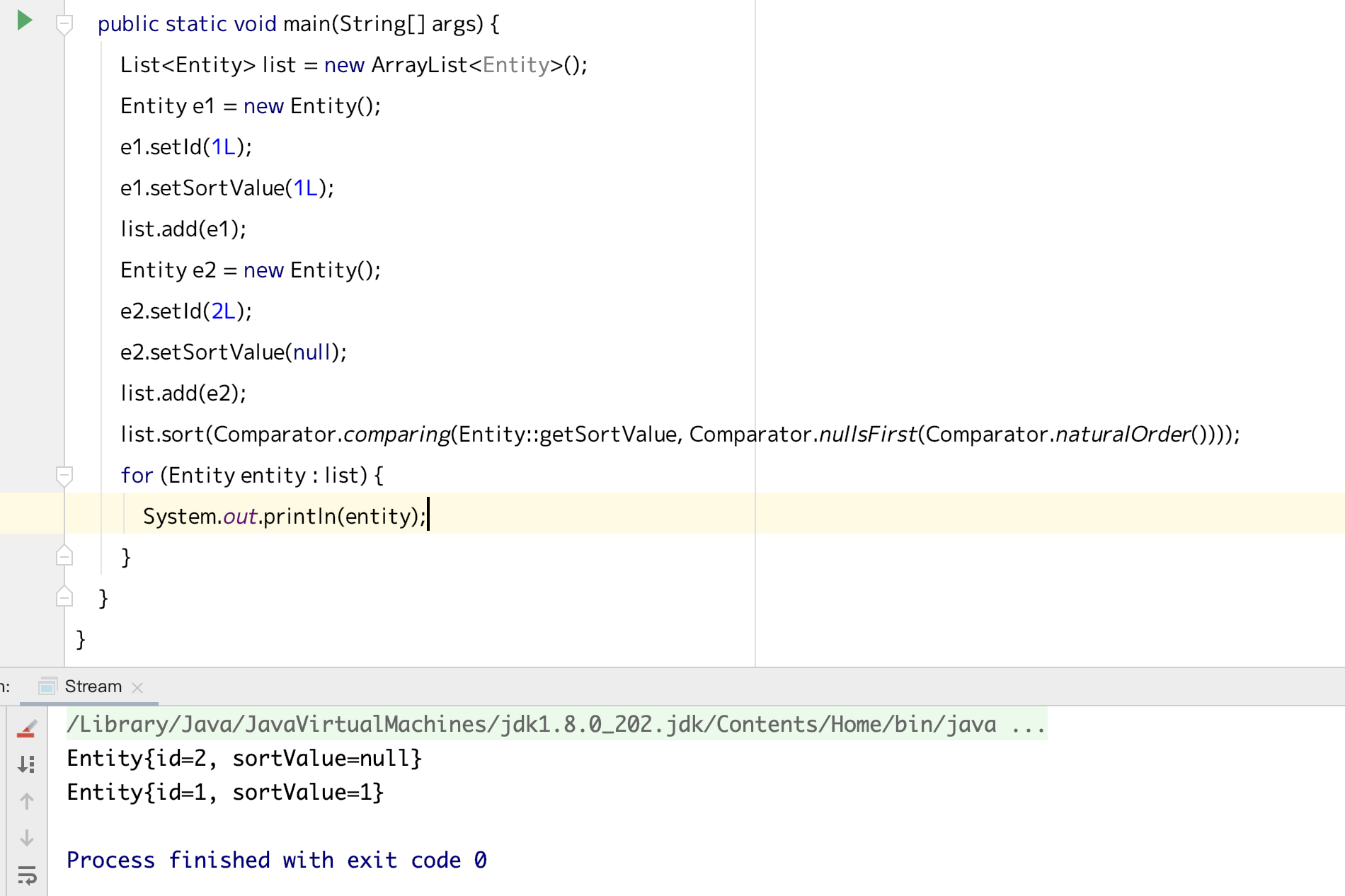
在Java8的stream之前,将对象进行排序的时候,可能需要对象实现Comparable接口,或者自己实现一个Comparator,

比如这样子

我的对象是Entity

1
2
3
4
5
6
7
8
9
10
11
12
13
14
15
16
17
18
19
20
21
22
public class Entity {

private Long id;

private Long sortValue;

public Long getId() {
return id;
}

public void setId(Long id) {
this.id = id;
}

public Long getSortValue() {
return sortValue;
}

public void setSortValue(Long sortValue) {
this.sortValue = sortValue;
}
}

Comparator

1
2
3
4
5
6
7
8
9
10
11
12
13
14
public class MyComparator implements Comparator {
@Override
public int compare(Object o1, Object o2) {
Entity e1 = (Entity) o1;
Entity e2 = (Entity) o2;
if (e1.getSortValue() < e2.getSortValue()) {
return -1;
} else if (e1.getSortValue().equals(e2.getSortValue())) {
return 0;
} else {
return 1;
}
}
}

比较代码

1
2
3
4
5
6
7
8
9
10
11
12
13
private static MyComparator myComparator = new MyComparator();

public static void main(String[] args) {
List<Entity> list = new ArrayList<Entity>();
Entity e1 = new Entity();
e1.setId(1L);
e1.setSortValue(1L);
list.add(e1);
Entity e2 = new Entity();
e2.setId(2L);
e2.setSortValue(null);
list.add(e2);
Collections.sort(list, myComparator);

看到这里的e2的排序值是null,在Comparator中如果要正常运行的话,就得判空之类的,这里有两点需要,一个是不想写这个MyComparator,然后也没那么好排除掉list里排序值,那么有什么办法能解决这种问题呢,应该说java的这方面真的是很强大

看一下nullsFirst的实现

1
2
3
4
5
6
7
8
9
10
11
12
13
14
15
16
17
18
19
20
21
22
final static class NullComparator<T> implements Comparator<T>, Serializable {
private static final long serialVersionUID = -7569533591570686392L;
private final boolean nullFirst;
// if null, non-null Ts are considered equal
private final Comparator<T> real;

@SuppressWarnings("unchecked")
NullComparator(boolean nullFirst, Comparator<? super T> real) {
this.nullFirst = nullFirst;
this.real = (Comparator<T>) real;
}

@Override
public int compare(T a, T b) {
if (a == null) {
return (b == null) ? 0 : (nullFirst ? -1 : 1);
} else if (b == null) {
return nullFirst ? 1: -1;
} else {
return (real == null) ? 0 : real.compare(a, b);
}
}

核心代码就是下面这段,其实就是帮我们把前面要做的事情做掉了,是不是挺方便的,小记一下哈

最近做 docker 系列,会经常进到 docker 内部,如上一篇介绍的,这些镜像一般都有用 ubuntu 或者alpine 这样的 Linux 系统作为底包,如果构建镜像的时候没有替换源的话,因为你懂的原因,在内部想编辑下东西要安装 vim 就会很慢很慢,thousand years later~
而且如果在容器内部想改源配置的话也要编辑器,就陷入了一个鸡生蛋,跟蛋生鸡的问题中,对于 linux 大神来说应该有一万种方法解决这个问题,对于我这个渣渣来说可能只想到了这个土方法,先 cp backup 一下 sources.list, 再 echo “xxx” > sources.list, 这里就碰到了一个问题,这个 sources.list 一般不止一行,直接 echo 的话就解析不了了,不过 echo 可以支持”\n”转义,就是加-e
看一下解释和示例

还有一点也是在这个时候要安装 vim 之类的,得知道是什么镜像底包,如果是用 uname 指令,其实看到的是宿主机的系统,得用cat /etc/issue

这里稍稍记一下

运行第一个 Dockerfile

上一篇的 Dockerfile 我们停留在构建阶段,现在来把它跑起来

1
2
docker run -d -p 80 --name static_web nicksxs/static_web \
nginx -g "daemon off;"

这里的-d表示以分离模型运行docker (detached),然后-p 是表示将容器的 80 端口开放给宿主机,然后容器名就叫 static_web,使用了我们上次构建的 static_web 镜像,后面的是让 nginx 在前台运行

可以看到返回了个容器 id,但是具体情况没出现,也没连上去,那我们想看看怎么访问在 Dockerfile 里写的静态页面,我们来看下docker 进程

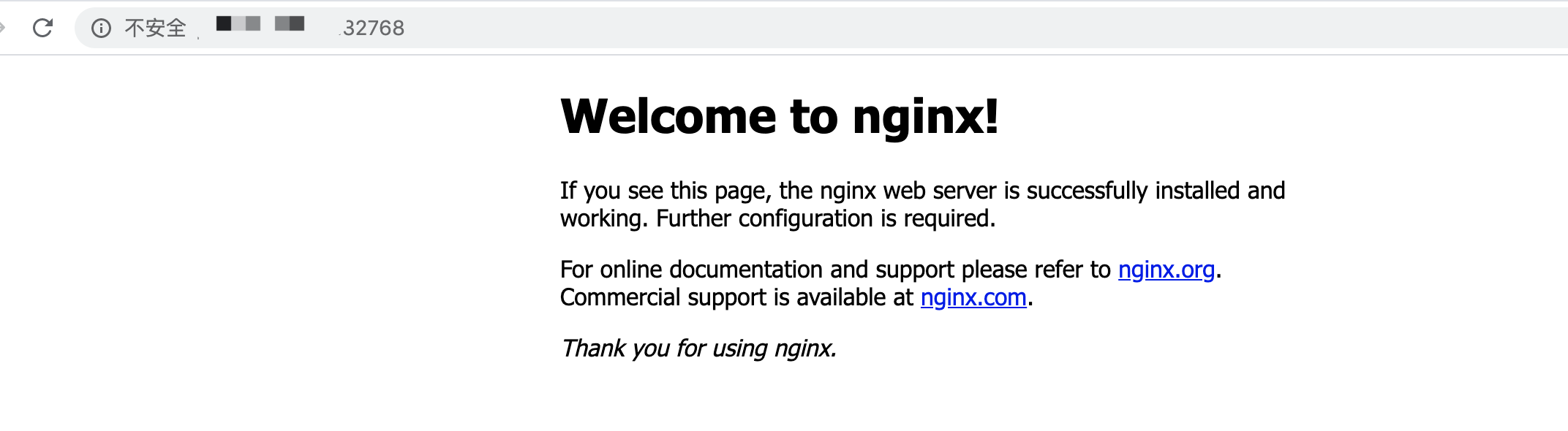
发现为我们随机分配了一个宿主机的端口,32768,去服务器的防火墙把这个外网端口开一下,看看是不是符合我们的预期呢

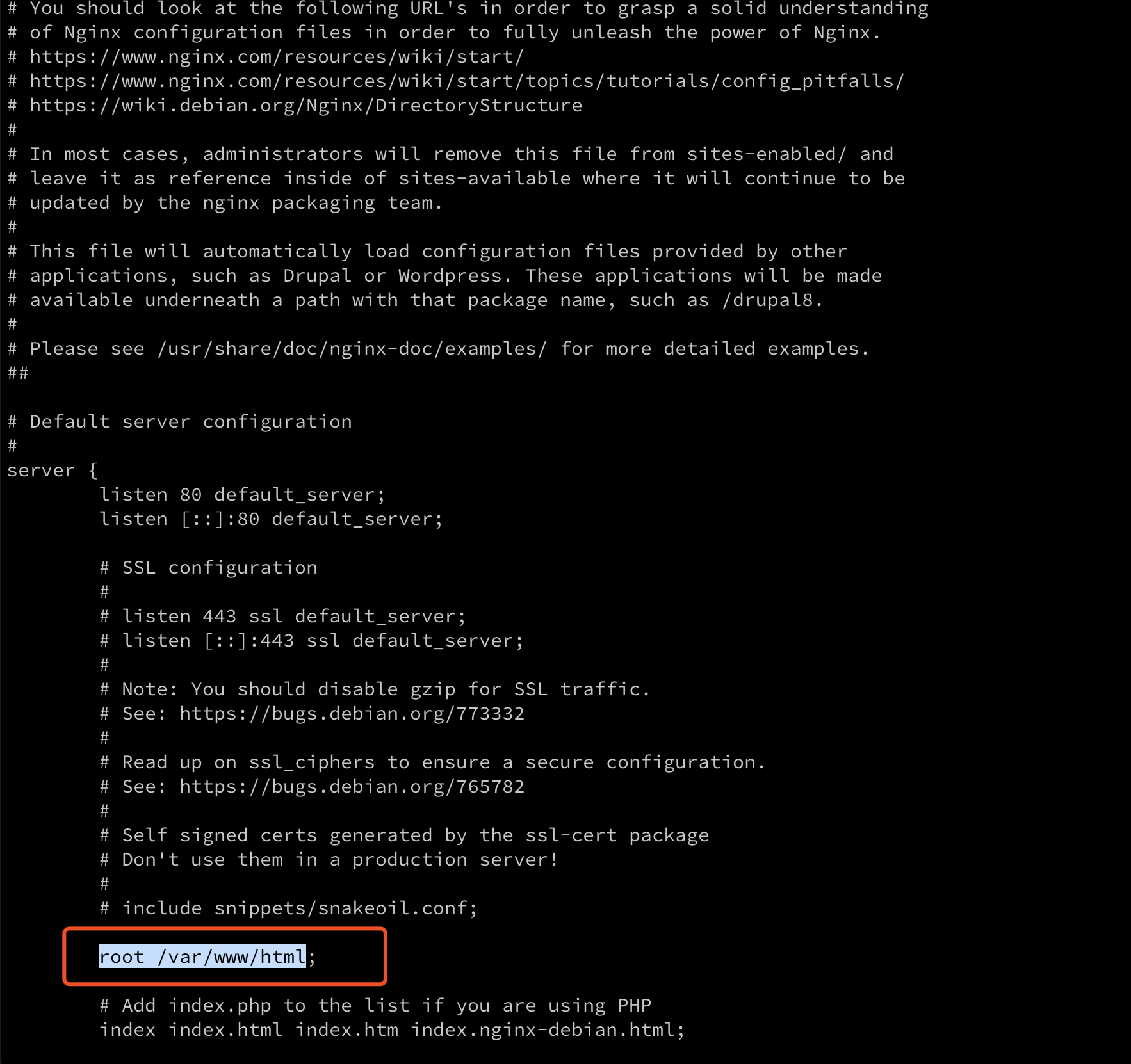
好像不太对额,应该是 ubuntu 安装的 nginx 的默认工作目录不对,我们来进容器看看,再熟悉下命令docker exec -it 4792455ca2ed /bin/bash
记得容器 id 换成自己的,进入容器后得找找 nginx 的配置文件,通常在/etc/nginx,/usr/local/etc等目录下,然后找到我们的目录是在这

所以把刚才的内容复制过去再试试

目标达成,give me five✌️

第二个 Dockerfile

然后就想来动态一点的,毕竟写过 PHP,就来试试 PHP
再建一个目录叫 dynamic_web,里面创建 src 目录,放一个 index.php
内容是

1
2
<?php
echo "Hello World!";

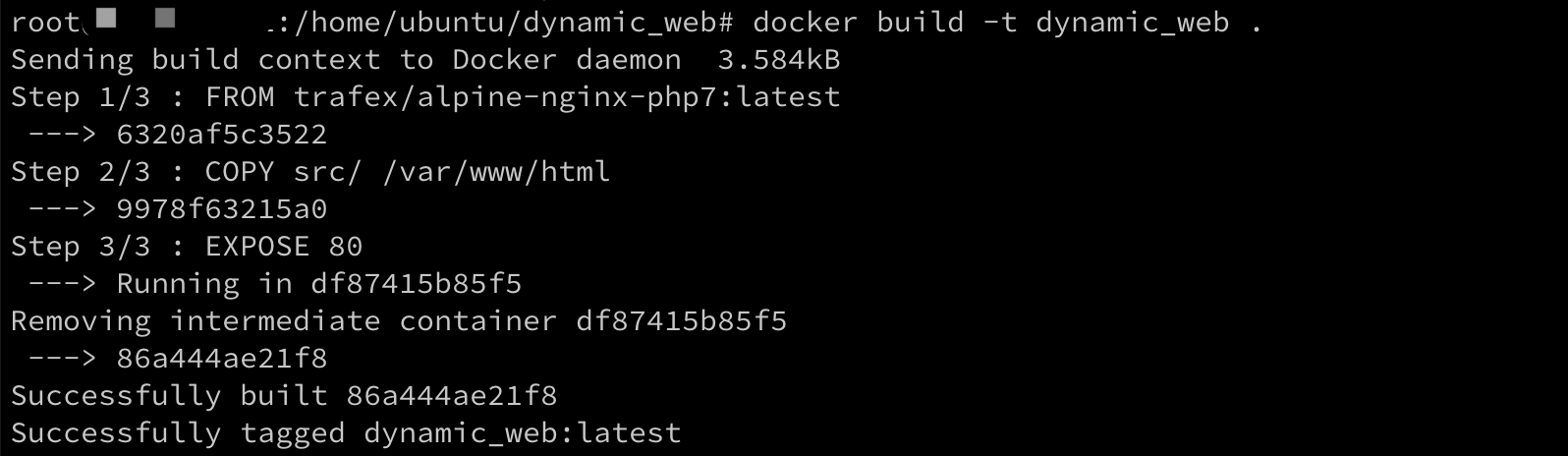
然后在 dynamic_web 目录下创建 Dockerfile,

1
2
3
FROM trafex/alpine-nginx-php7:latest
COPY src/ /var/www/html
EXPOSE 80

Dockerfile 虽然只有三行,不过要着重说明下,这个底包其实不是docker 官方的,有两点考虑,一点是官方的基本都是 php apache 的镜像,还有就是 alpine这个,截取一段中文介绍

Alpine 操作系统是一个面向安全的轻型 Linux 发行版。它不同于通常 Linux 发行版,Alpine 采用了 musl libc 和 busybox 以减小系统的体积和运行时资源消耗,但功能上比 busybox 又完善的多,因此得到开源社区越来越多的青睐。在保持瘦身的同时,Alpine 还提供了自己的包管理工具 apk,可以通过 https://pkgs.alpinelinux.org/packages 网站上查询包信息,也可以直接通过 apk 命令直接查询和安装各种软件。
Alpine 由非商业组织维护的,支持广泛场景的 Linux发行版,它特别为资深/重度Linux用户而优化,关注安全,性能和资源效能。Alpine 镜像可以适用于更多常用场景,并且是一个优秀的可以适用于生产的基础系统/环境。

Alpine Docker 镜像也继承了 Alpine Linux 发行版的这些优势。相比于其他 Docker 镜像,它的容量非常小,仅仅只有 5 MB 左右(对比 Ubuntu 系列镜像接近 200 MB),且拥有非常友好的包管理机制。官方镜像来自 docker-alpine 项目。

目前 Docker 官方已开始推荐使用 Alpine 替代之前的 Ubuntu 做为基础镜像环境。这样会带来多个好处。包括镜像下载速度加快,镜像安全性提高,主机之间的切换更方便,占用更少磁盘空间等。

一方面在没有镜像的情况下,拉取 docker 镜像还是比较费力的,第二个就是也能节省硬盘空间,所以目前有大部分的 docker 镜像都将 alpine 作为基础镜像了
然后再来构建下

这里还有个点,就是上面的那个镜像我们也是 EXPOSE 80端口,然后外部宿主机会随机映射一个端口,为了偷个懒,我们就直接指定外部端口了
docker run -d -p 80:80 dynamic_web打开浏览器发现访问不了,咋回事呢
因为我们没看trafex/alpine-nginx-php7:latest这个镜像说明,它内部的服务是 8080 端口的,所以我们映射的暴露端口应该是 8080,再用docker run -d -p 80:8080 dynamic_web这个启动,

限制下 docker 的 cpu 使用率

这里我们开始玩一点有意思的,我们在容器里装下 vim 和 gcc,然后写这样一段 c 代码

1
2
3
4
5
6
7
#include <stdio.h>
int main(void)
{
int i = 0;
for(;;) i++;
return 0;
}

就是一个最简单的死循环,然后在容器里跑起来

1
2
$ gcc 1.c 
$ ./a.out

然后我们来看下系统资源占用(CPU)
Xs562iawhHyMxeO
上图是在容器里的,可以看到 cpu 已经 100%了
然后看看容器外面的
ecqH8XJ4k7rKhzu
可以看到一个核的 cpu 也被占满了,因为是个双核的机器,并且代码是单线程的
然后呢我们要做点啥
因为已经在这个 ubuntu 容器中装了 vim 和 gcc,考虑到国内的网络,所以我们先把这个容器 commit 一下,

1
docker commit -a "nick" -m "my ubuntu" f63c5607df06 my_ubuntu:v1

然后再运行起来

1
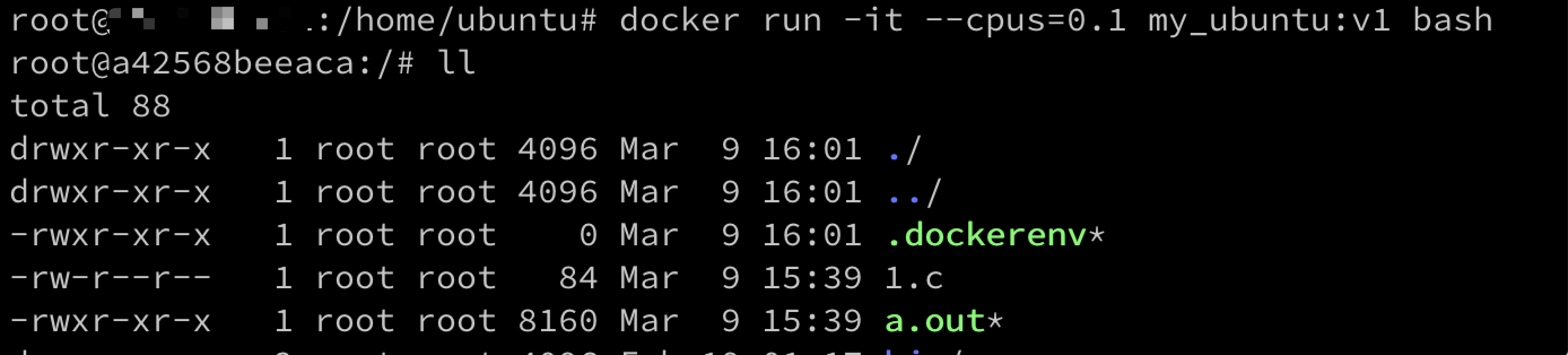
docker run -it --cpus=0.1 my_ubuntu:v1 bash


我们的代码跟可执行文件都还在,要的就是这个效果,然后再运行一下

结果是这个样子的,有点神奇是不,关键就在于 run 的时候的--cpus=0.1这个参数,它其实就是基于我前一篇说的 cgroup 技术,能将进程之间的cpu,内存等资源进行隔离

开始第一个 Dockerfile

上一面为了复用那个我装了 vim 跟 gcc 的容器,我把它提交到了本地,使用了docker commit命令,有点类似于 git 的 commit,但是这个不是个很好的操作方式,需要手动介入,这里更推荐使用 Dockerfile 来构建镜像

1
2
3
4
5
6
7
8
From ubuntu:latest
MAINTAINER Nicksxs "nicksxs@hotmail.com"
RUN sed -i s@/archive.ubuntu.com/@/mirrors.aliyun.com/@g /etc/apt/sources.list
RUN apt-get clean
RUN apt-get update && apt install -y nginx
RUN echo 'Hi, i am in container' \
> /usr/share/nginx/html/index.html
EXPOSE 80

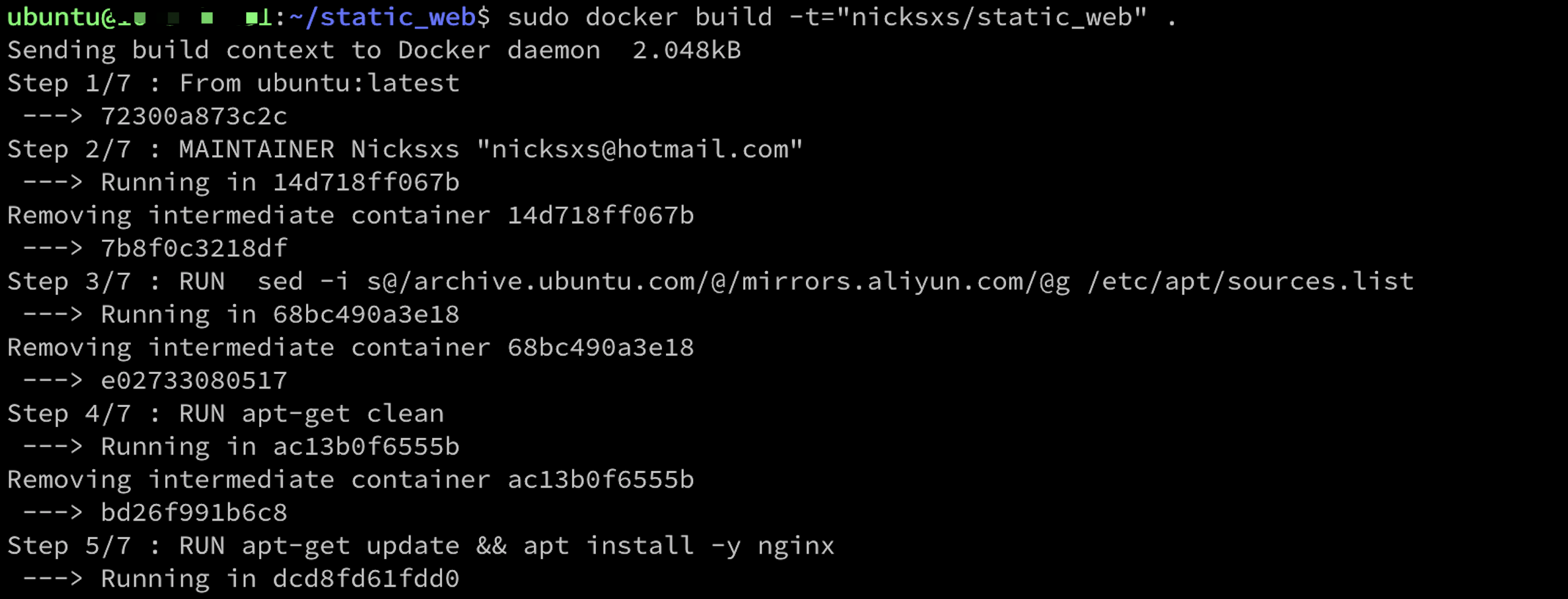
先解释下这是在干嘛,首先是这个From ubuntu:latest基于的 ubuntu 的最新版本的镜像,然后第二行是维护人的信息,第三四行么作为墙内人你懂的,把 ubuntu 的源换成阿里云的,不然就有的等了,然后就是装下 nginx,往默认的 nginx 的入口 html 文件里输入一行欢迎语,然后暴露 80 端口
然后我们使用sudo docker build -t="nicksxs/static_web" .命令来基于这个 Dockerfile 构建我们自己的镜像,过程中是这样的


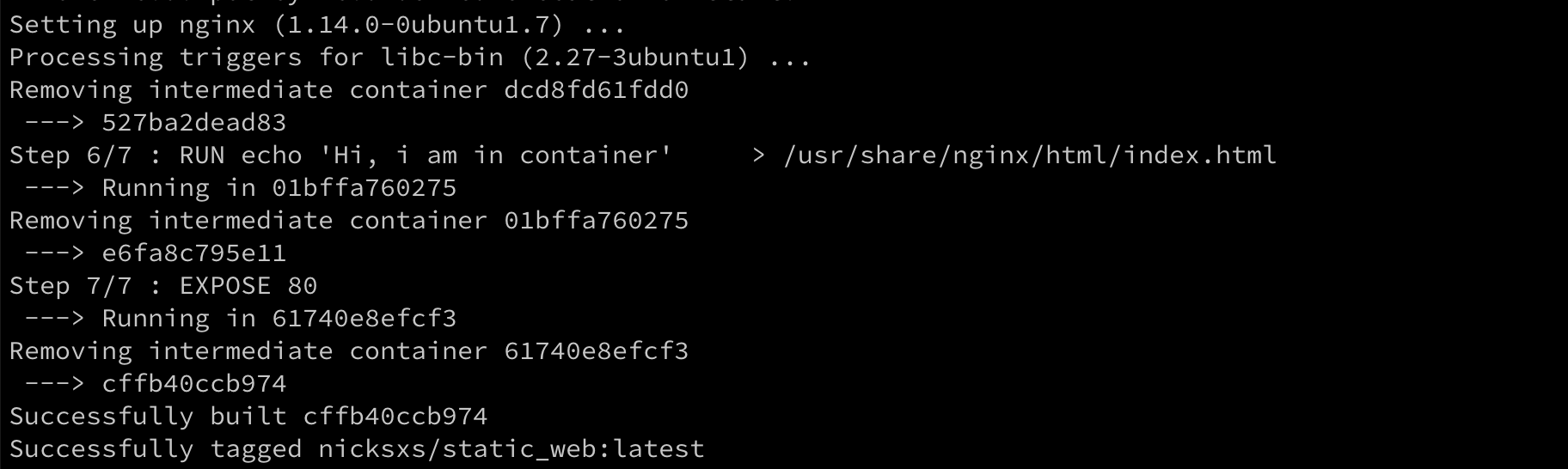
可以看到图中,我的 Dockerfile 是 7 行,里面就执行了 7 步,并且每一步都有一个类似于容器 id 的层 id 出来,这里就是一个比较重要的东西,docker 在构建的时候其实是有这个层的概念,Dockerfile 里的每一行都会往上加一层,这里有还注意下命令后面的.,代表当前目录下会自行去寻找 Dockerfile 进行构建,构建完了之后我们再看下我们的本地镜像

我们自己的镜像出现啦
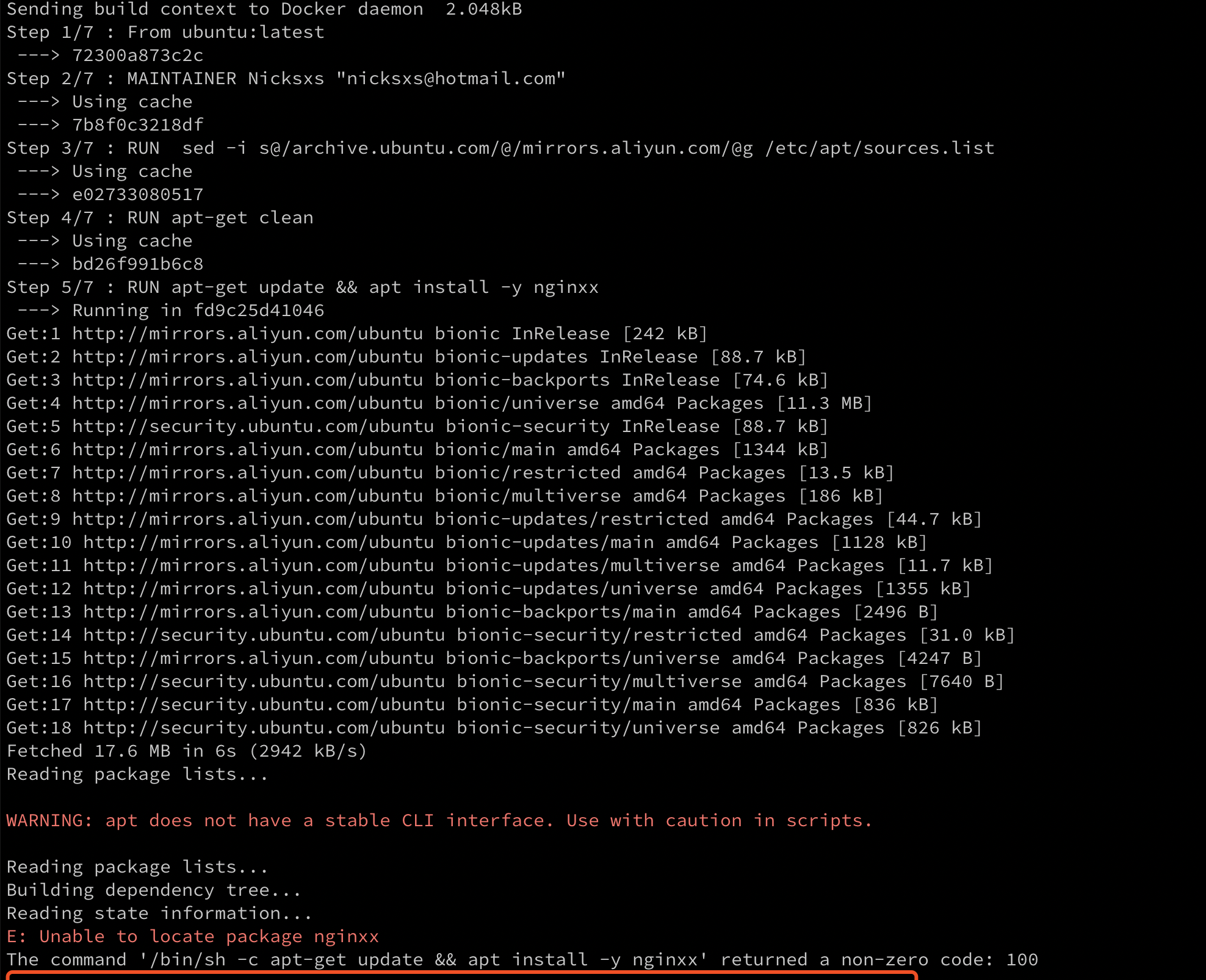
然后有个问题,如果这个构建中途报了错咋办呢,来试试看,我们把 nginx 改成随便的一个错误名,nginxx(不知道会不会运气好真的有这玩意),再来 build 一把

找不到 nginxx 包,是不是这个镜像就完全不能用呢,当然也不是,因为前面说到了,docker 是基于层去构建的,可以看到前面的 4 个 step 都没报错,那我们基于最后的成功步骤创建下容器看看
也就是sudo docker run -t -i bd26f991b6c8 /bin/bash
答案是可以的,只是没装成功 nginx

还有一点注意到没,前面的几个 step 都有一句 Using cache,说明 docker 在构建镜像的时候是有缓存的,这也更能说明 docker 是基于层去构建镜像,同样的底包,同样的步骤,这些层是可以被复用的,这就是 docker 的构建缓存,当然我们也可以在 build 的时候加上--no-cache去把构建缓存禁用掉。

因为最近想搭一个phabricator用来做看板和任务管理,一开始了解这个是Easy大大有在微博推荐过,后来苏洋也在群里和博客里说到了,看上去还不错的样子,因为主角是docker所以就不介绍太多,后面有机会写一下。

docker最开始是之前在某位大佬的博客看到的,看上去有点神奇,感觉是一种轻量级的虚拟机,但是能做的事情好像差不多,那时候是在Ubuntu系统的vps里起一个Ubuntu的docker,然后在里面装个nginx,配置端口映射就可以访问了,后来也草草写过一篇使用docker搭建mysql集群,但是最近看了下好像是因为装docker的大佬做了一些别名还是什么操作,导致里面用的操作都不具有普遍性,而且主要是把搭的过程写了下,属于囫囵吞枣,没理解docker是干啥的,为啥用docker,就是操作了下,这几天借着搭phabricator的过程,把一些原来不理解,或者原来理解错误的地方重新理一下。

之前写的 mysql 集群,一主二备,这种架构在很多小型应用里都是这么配置的,而且一般是直接在三台 vps 里启动三个 mysql 实例,但是如果换成 docker 会有什么好处呢,其实就是方便部署,比如其中一台备库挂了,我要加一台,或者说备库的 qps 太高了,需要再加一个,如果要在 vps 上搭建的话,首先要买一台机器,等初始化,然后在上面修改源,更新,装 mysql ,然后配置主从,可能还要处理防火墙等等,如果把这些打包成一个 docker 镜像,并且放在自己的 docker registry,那就直接run 一下就可以了;还有比如在公司要给一个新同学整一套开发测试环境,以 Java 开发为例,要装 git,maven,jdk,配置 maven settings 和各种 rc,整合在一个镜像里的话,就会很方便了;再比如微服务的水平扩展。

但是为啥 docker 会有这种优势,听起来好像虚拟机也可以干这个事,但是虚拟机动辄上 G,而且需要 VMware,virtual box 等支持,不适合在Linux服务器环境使用,而且占用资源也会非常大。说得这么好,那么 docker 是啥呢

docker 主要使用 Linux 中已经存在的两种技术的一个整合升级,一个是 namespace,一个是cgroups,相比于虚拟机需要完整虚拟出一个操作系统运行基础,docker 基于宿主机内核,通过 namespace 和 cgroups 分隔进程,理念就是提供一个隔离的最小化运行依赖,这样子相对于虚拟机就有了巨大的便利性,具体的 namespace 和 cgroups 就先不展开讲,可以参考耗子叔的文章

安装

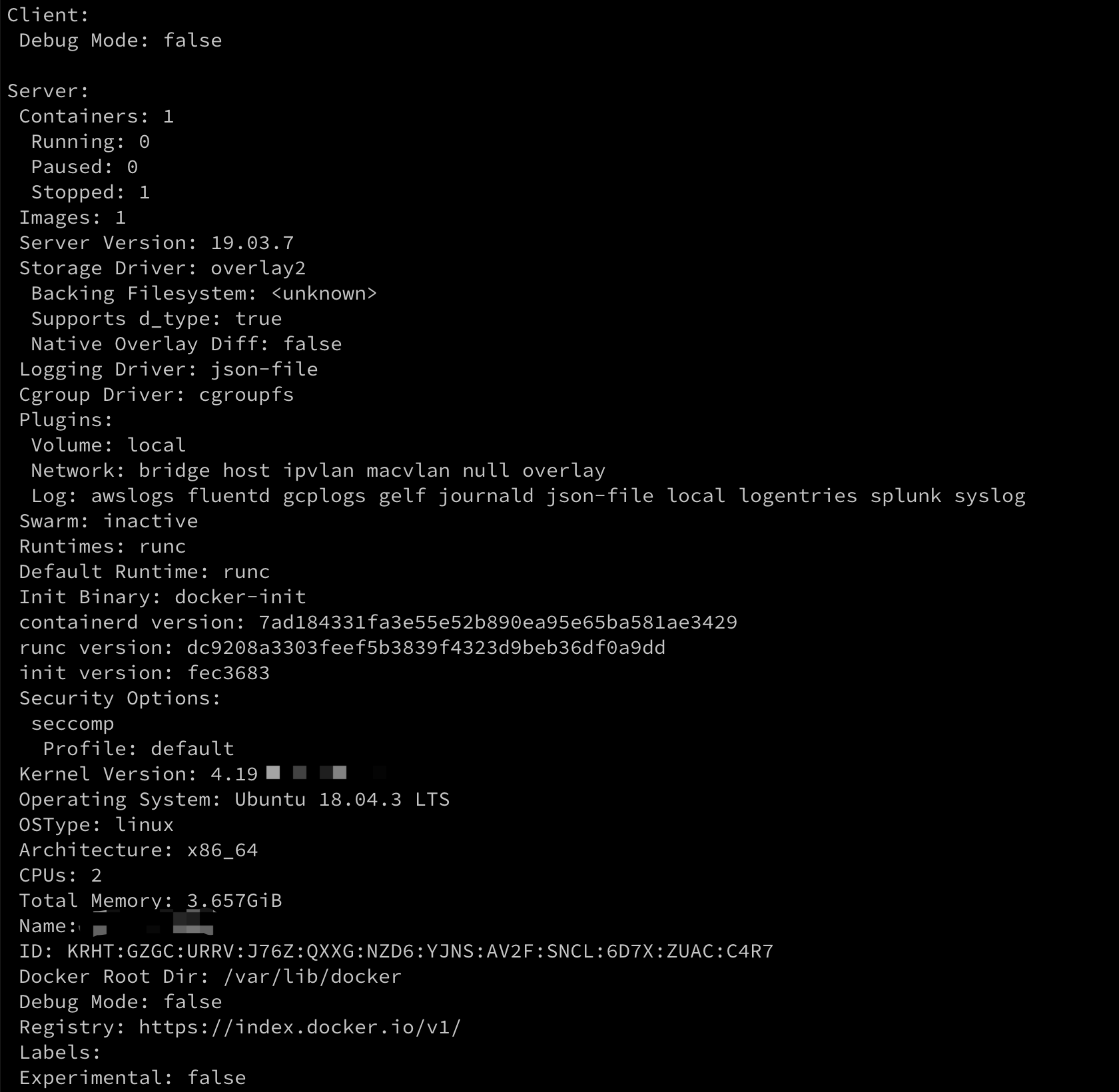
那么我们先安装下 docker,参考官方的教程,安装,我的系统是 ubuntu 的,就贴了 ubuntu 的链接,用其他系统的可以找到对应的系统文档安装,安装完了的话看看 docker 的信息

1
sudo docker info

输出以下信息

简单运行

然后再来运行个 hello world 呗,

1
sudo docker run hello-world

输出了这些

看看这个运行命令是怎么用的,一般都会看到这样子的,sudo docker run -it ubuntu bash, 前面的 docker run 反正就是运行一个容器的意思,-it是啥呢,还有这个什么 ubuntu bash,来看看docker run`的命令帮助信息

1
-i, --interactive                    Keep STDIN open even if not attached

就是要有输入,我们运行的时候能输入

1
-t, --tty                            Allocate a pseudo-TTY

要有个虚拟终端,

1
2
3
Usage:	docker run [OPTIONS] IMAGE [COMMAND] [ARG...]

Run a command in a new container

镜像

上面说的-it 就是这里的 options,后面那个 ubuntu 就是 image 辣,image 是啥呢

Docker 把应用程序及其依赖,打包在 image 文件里面,可以把它理解成为类似于虚拟机的镜像或者运行一个进程的代码,跑起来了的叫docker 容器或者进程,比如我们将要运行的docker run -it ubuntu bash的ubuntu 就是个 ubuntu 容器的镜像,将这个镜像运行起来后,我们可以进入容器像使用 ubuntu 一样使用它,来看下我们的镜像,使用sudo docker image ls就能列出我们宿主机上的 docker 镜像了

一个 ubuntu 镜像才 64MB,非常小巧,然后是后面的bash,我通过交互式启动了一个 ubuntu 容器,然后在这个启动的容器里运行了 bash 命令,这样就可以在容器里玩一下了

在容器里看下进程,

只有刚才运行容器的 bash 进程和我刚执行的 ps,这里有个可以注意下的,bash 这个进程的 pid 是 1,其实这里就用到了 linux 中的PID Namespace,容器会隔离出一个 pid 的名字空间,这里面的进程跟外部的 pid 命名独立

查看宿主机上的容器

1
sudo docker ps -a

如何进入一个正在运行中的 docker 容器

这个应该是比较常用的,因为比如是一个微服务容器,有时候就像看下运行状态,日志啥的

1
sudo docker exec -it [containerID] bash

查看日志

1
sudo docker logs [containerID]

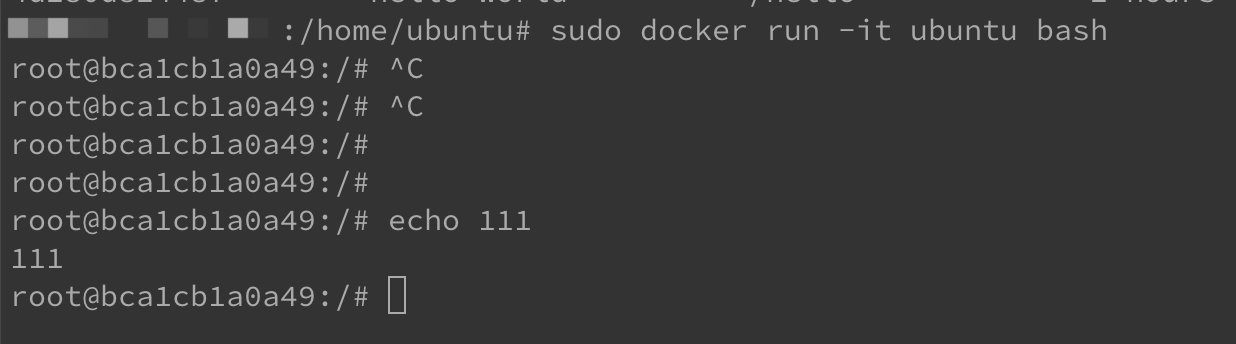
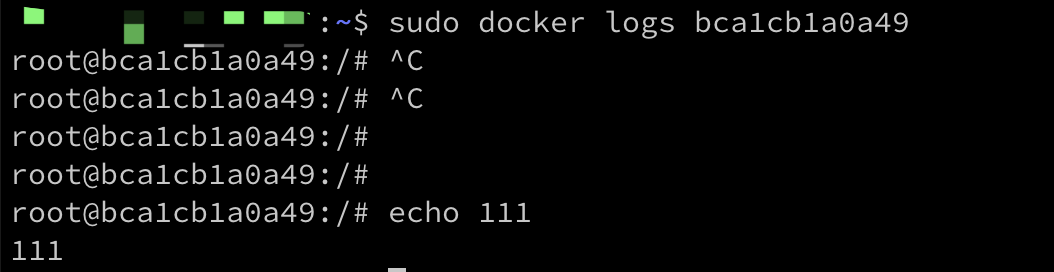
我在运行容器的终端里胡乱输入点啥,然后通过上面的命令就可以看到啦

寄生虫这部电影在获得奥斯卡之前就有关注了,豆瓣评分很高,一开始看到这个片名以为是像《铁线虫入侵》那种灾难片,后来看到男主,宋康昊,也是老面孔了,从高中时候在学校操场组织看的《汉江怪物》,有点二的感觉,后来在大学寝室电脑上重新看的时候,室友跟我说是韩国国宝级演员,真人不可貌相,感觉是个呆子的形象。

但是你说这不是个灾难片,而是个反映社会问题的,就业比较容易往这个方向猜,只是剧情会是怎么样的,一时也没啥头绪,后来不知道哪里看了下一个剧情透露,是一个穷人给富人做家教,然后把自己一家都带进富人家,如果是这样的话可能会把这个怎么带进去作为一个主线,不过事实告诉我,这没那么重要,从第一步朋友的介绍,就显得无比顺利,要去当家教了,作为一个穷成这样的人,瞬间转变成一个衣着得体,言行举止都没让富人家看出破绽的延世大学学生,这真的挺难让人理解,所谓江山易改,本性难移,还有就是这人也正好有那么好能力去辅导,并且诡异的是,多惠也是瞬间就喜欢上了男主,多惠跟将男主介绍给她做家教,也就是多惠原来的家教敏赫,应该也有不少的相处时间,这变了有点大了吧,当然这里也可能因为时长需要,如果说这一点是因为时长,那可能我所有的槽点都是因为这个吧,因为我理解的应该是把家里的人如何一步步地带进富人家,这应该是整个剧情的一个需要更多铺垫去克服这个矛盾点,有时候也想过如果我去当导演,是能拍出个啥,没这个机会,可能有也会是很扯淡的,当然这也不能阻拦我谈谈对这个点的一些看法,毕竟评价一台电冰箱不是说我必须得自己会制冷对吧,这大概是我觉得这个电影的第一个槽点,接下去接二连三的,就是我说的这个最核心的矛盾点,不知道谁说过,这种影视剧应该是源自于生活又高于生活,越是好的作品,越要接近生活,这样子才更能有感同身受。

接下去的点是金基宇介绍金基婷去给多颂当美术家教,这一步又是我理解的败笔吧,就怎么说呢,没什么铺垫,突然从一个社会底层的穷姑娘,转变成一个气场爆表,把富人家太太唬得一愣一愣的,如果说富太太是比较简单无脑的,那富人自己应该是比较有见识而且是做 IT 的,给自己儿子女儿做家教的,查查底细也很正常吧,但是啥都没有,然后呢,她又开始耍司机的心机了,真的是莫名其妙了,司机真的很惨,窈窕淑女君子好逑,而且这个操作也让我摸不着头脑,这是多腹黑并且有经验才会这么操作,脱内裤真的是让我看得一愣愣的,更看得我一愣一愣的,富人竟然也完全按着这个思路去想了,完全没有别的可能呢,甚至可以去查下行车记录仪或者怎样的,或者有没有毛发体液啥的去检验下,毕竟金基婷也乘坐过这辆车,但是最最让我不懂的还是脱内裤这个操作,究竟是什么样的人才会的呢,值得思考。

金基泽和忠淑的点也是比较奇怪,首先是金基泽,引起最后那个杀人事件的一个由头,大部分观点都是人为朴社长在之前跟老婆啪啪啪的时候说金基泽的身上有股乘地铁的人的味道,简而言之就是穷人的味道,还有去雯光丈夫身下拿钥匙是对金基泽和雯光丈夫身上的味道的鄙夷,可是这个原因真的站不住脚,即使是同样经济水平,如果身上有比较重的异味,背后讨论下,或者闻到了比较重的味道,有不适的表情和动作很正常吧,像雯光丈夫,在地下室里呆了那么久,身上有异味并且比较重太正常了,就跟在厕所呆久了不会觉得味道大,但是从没味道的地方一进有点味道的厕所就会觉得异样,略尴尬的理由;再说忠淑呢,感觉是太厉害了,能胜任这么一家有钱人的各种挑剔的饮食口味要求的保姆职位,也是让人看懵逼了,看到了不禁想到一个问题,这家人开头是那么地穷,不堪,突然转变成这么地像骗子家族,如果有这么好的骗人能力,应该不会到这种地步吧,如果真的是那么穷,没能力,没志气,又怎么会突然变成这么厉害呢,一家人各司其职,把富人家唬得团团转,而这个前提是,这些人的确能胜任这四个位置,这就是我非常不能理解的点。

然后说回这个标题,寄生虫,不知道是不是翻译过来不准确,如果真的是叫寄生虫的话,这个寄生虫智商未免也太低了,没有像新冠那样机制,致死率低一点,传染能力强一点,潜伏期也能传染,这个寄生虫第一次受到免疫系统的攻击就自爆了;还有呢,作为一个社会比较低层的打工者,乡下人,对这个审题也是不太审的清,是指这一家人是社会的寄生虫,不思进取,并且死的应该,富人是傻白甜,又有钱又善良,这是给有钱人洗地了还是啥,这个奥斯卡真不知道是怎么得的,总觉得奥斯卡,甚至低一点,豆瓣,得奖的,评分高的都是被一群“精英党”把持的,有黑人主角的,得分高;有同性恋的,得分高;结局惨的,得分高;看不懂的,得分高;就像肖申克的救赎,真不知道是哪里好了,最近看了关于明朝那些事的三杨,杨溥的经历应该比这个厉害吧,可是外国人看不懂,就像外国人不懂中国为什么有反分裂国家法,经历了鸦片战争,八国联军,抗日战争等等,其实跟外国对于黑人的权益的问题,因为有南北战争,所以极度重视这个问题,相应的中国也有自己的历史,请理解。

简而言之我对寄生虫的评分大概 5~6 分吧。

众所周知,我是个前端彩笔,但是也想做点自己可以用的工具页面,所以就让朋友推荐了蚂蚁出品的 ant design,说基本可以直接 ctrl-c ctrl-v,实测对我这种来说还是有点难的,不过也能写点,但是现在碰到的问题是怎么部署到自己的服务器上去
用 ant design 写的是个单页应用,实际来说就是一个 html 加 css 跟 js,最初的时候是直接 build 完就 scp 上去,也考虑过 rsync 之类的,但是都感觉不够自动化,正好自己还没这方面的经验就想折腾下,因为我自己搭的仓库应用是 gogs,搜了一下主要是跟 drones 配合做 ci/cd,研究了一下发现其实这个事情没必要这么搞(PS:drone 也不好用),整个 hook 就可以了, 但是实际上呢,这东西也不是那么简单
首先是需要在服务器上装 webhook,这个我一开始用 snap 安装,但是出现问题,run 的时候会出现后面参数带的 hooks.json 文件找不到,然后索性就直接 github 上下最新版,放 /usr/local/bin 了,webhook 的原理呢其实也比较简单,就是起一个 http 服务,通过 post 请求调用,解析下参数,如果跟配置的参数一致,就调用对应的命令或者脚本。

配置 hooks.json

webhook 的配置,需要的两个文件,一个是 hooks.json,这个是 webhook 服务的配置文件,像这样

1
2
3
4
5
6
7
8
9
10
11
12
13
14
15
16
17
18
19
20
21
22
23
24
25
26
27
28
29
30
31
32
33
34
35
36
37
38
39
40
41
42
43
44
45
46
47
48
49
50
51
52
[
{
"id": "redeploy-app",
"execute-command": "/opt/scripts/redeploy.sh",
"command-working-directory": "/opt/scripts",
"pass-arguments-to-command":
[
{
"source": "payload",
"name": "head_commit.message"
},
{
"source": "payload",
"name": "pusher.name"
},
{
"source": "payload",
"name": "head_commit.id"
}
],
"trigger-rule":
{
"and":
[
{
"match":
{
"type": "payload-hash-sha1",
"secret": "your-github-secret",
"parameter":
{
"source": "header",
"name": "X-Hub-Signature"
}
}
},
{
"match":
{
"type": "value",
"value": "refs/heads/master",
"parameter":
{
"source": "payload",
"name": "ref"
}
}
}
]
}
}
]

这是个跟 github搭配的示例,首先 id 表示的是这个对应 hook 的识别 id,也可以看到这个 hooks.json 的结构是这样的一个数组,然后就是要执行的命令和命令执行的参数,值得注意的是这个trigger-rule,就是请求进来了回去匹配里面的,比如前一个是一个加密的,放在请求头里,第二个 match 表示请求里的 ref 是个 master 分支,就可以区分分支进行不同操作,但是前面的加密配合 gogs 使用的时候有个问题(PS: webhook 的文档是真的烂),gogs 设置 webhook 的加密是用的

密钥文本将被用于计算推送内容的 SHA256 HMAC 哈希值,并设置为 X-Gogs-Signature 请求头的值。

这种加密方式,所以 webhook 的这个示例的加密方式不行,但这货的文档里居然没有说明支持哪些加密,神TM,后来还是翻 issue 翻到了, 需要使用这个payload-hash-sha256

执行脚本 redeploy.sh

脚本类似于这样

1
2
3
4
5
6
7
8
9
10
11
12
13
14
15
#!/bin/bash -e

function cleanup {
echo "Error occoured"
}
trap cleanup ERR

commit_message=$1 # head_commit.message
pusher_name=$2 # pusher.name
commit_id=$3 # head_commit.id


cd ~/do-react-example-app/
git pull origin master
yarn && yarn build

就是简单的拉代码,然后构建下,真实使用时可能不是这样,因为页面会部署在 nginx 的作用目录,还需要 rsync 过去,这部分可能还涉及到两个问题第一个是使用 rsync 还是其他的 cp,不过这个无所谓;第二个是目录权限的问题,以我的系统ubuntu 为例,默认用户是 ubuntu,nginx 部署的目录是 www,所以需要切换用户等操作,一开始是想用在shell 文件中直接写了密码,但是不知道咋传,查了下是类似于这样 echo "passwd" | sudo -S cmd,通过管道命令往后传,然后就是这个-S, 参数的解释是-S, --stdin read password from standard input,但是这样么也不是太安全的赶脚,又看了下还有两种方法,

  • 就是给root 设置一个不需要密码的命令类似于这样,

    1
    2
    myusername ALL = (ALL) ALL
    myusername ALL = (root) NOPASSWD: /path/to/my/program
  • 另一种就是把默认用户跟 root 设置成同一个 group 的

使用

真正实操的时候其实还有不少问题,首先运行 webhook 就碰到了我前面说的,使用 snap 运行的时候会找不到前面的 hooks.json配置文件,执行snap run webhook -hooks /opt/hooks/hooks.json -verbose就碰到下面的couldn't load hooks from file! open /opt/hooks/hooks.json: no such file or directory,后来直接下了个官方最新的 release,就直接执行 webhook -hooks /opt/hooks/hooks.json -verbose 就可以了,然后是前面的示例配置文件里的几个参数,比如head_commit.message 其实 gogs 推过来的根本没这玩意,而且都是数组,不知道咋取,烂文档,不过总比搭个 drone 好一点就忍了。补充一点就是在 debug 的时候需要看下问题出在哪,看看脚本有没有执行,所以需要在前面的 json 里加这个参数"include-command-output-in-response": true, 就能输出来脚本执行结果

Maven 翻译为”专家”、”内行”,是 Apache 下的一个纯 Java 开发的开源项目。基于项目对象模型(缩写:POM)概念,Maven利用一个中央信息片断能管理一个项目的构建、报告和文档等步骤。

Maven 是一个项目管理工具,可以对 Java 项目进行构建、依赖管理。

Maven 也可被用于构建和管理各种项目,例如 C#,Ruby,Scala 和其他语言编写的项目。Maven 曾是 Jakarta 项目的子项目,现为由 Apache 软件基金会主持的独立 Apache 项目。

maven也是我们日常项目中实用的包管理工具,相比以前需要用把包下载下来,放进 lib 中,在平时工作中使用的话,其实像 idea 这样的 ide 工具都会自带 maven 工具和插件

maven的基本操作

  • mvn -v
    查看 maven 信息
  • mvn compile
    将 Java 编译成 class 文件
  • mvn test
    执行 test 包下的测试用例
  • mvn package
    将项目打成 jar 包
  • mvn clean
    删除package 在 target 目录下面打出来的 jar 包和 target 目录
  • mvn install
    将打出来的 jar 包复制到 maven 的本地仓库里
  • mvn deploy
    将打出来的 jar 包上传到远程仓库里

与 composer 对比

因为我也是个 PHP 程序员,所以对比一下两种语言,很容易想到在 PHP 的 composer 跟 Java 的 maven 是比较类似的作用,有一点两者是非常相似的,就是原仓库都是因为某些原因连接拉取都会很慢,所以像 composer 会有一些国内源,前阵子阿里也出了一个,类似的 maven 一般也会使用阿里的镜像仓库,通过在 setting.xml 文件中的设置

1
2
3
4
5
6
7
8
<mirrors>
<mirror>
<id>aliyun</id>
<name>aliyun maven</name>
<url>http://maven.aliyun.com/nexus/content/groups/public/</url>
<mirrorOf>central</mirrorOf>
</mirror>
</mirrors>

这算是个尴尬的共同点,然后因为 PHP 是解释型脚本语言,所以 php 打出来的 composer 包其实就是个 php 代码包,使用SPL Autoload等方式加载代码包,maven 包则是经过编译的 class 包,还有一点是 composer 也可以直接使用 github 地址作为包代码的拉取源,这点也是比较大的区别,maven使用 pom 文件管理依赖

maven 的个人小技巧

  • maven 拉取依赖时,同时将 snapshot 也更新了,就是 mvn compile加个-U参数,如果还不行就需要将本地仓库的 snapshot 删掉,
    这个命令的 help 命令解释是 -U,–update-snapshots Forces a check for missing releases and updated snapshots on
    remote repositories,这个在日常使用中还是很经常使用的
  • maven 出现依赖冲突的时候的解决方法
    首先是依赖分析,使用mvn dependency:tree分析下依赖关系,如果要找具体某个包的依赖引用关系可以使用mvn dependency:tree -Dverbose -Dincludes=org.springframework:spring-webmvc命令进行分析,如果发现有冲突的依赖关系,本身 maven 中依赖引用有相对的顺序,大致来说是引用路径短的优先,pom 文件中定义的顺序优先,如果要把冲突的包排除掉可以在 pom 中用
    1
    2
    3
    4
    5
    6
    <exclusions>
    <exclusion>
    <groupId>ch.qos.logback</groupId>
    <artifactId>logback-classic</artifactId>
    </exclusion>
    </exclusions>
    将冲突的包排除掉
  • maven 依赖的 jdk 版本管理
    前面介绍的mvn -v可以查看 maven 的安装信息
    比如
    1
    2
    3
    4
    5
    Apache Maven 3.6.3 (cecedd343002696d0abb50b32b541b8a6ba2883f)
    Maven home: /usr/local/Cellar/maven/3.6.3_1/libexec
    Java version: 1.8.0_201, vendor: Oracle Corporation, runtime: /Library/Java/JavaVirtualMachines/jdk1.8.0_201.jdk/Contents/Home/jre
    Default locale: zh_CN, platform encoding: UTF-8
    OS name: "mac os x", version: "10.14.6", arch: "x86_64", family: "mac"
    这里可以看到用了 mac 自带的 jdk1.8,结合我之前碰到的一个问题,因为使用 homebrew 升级了 gradle,而 gradle 又依赖了 jdk13,因为这个 mvn 的 Java version 也变成 jdk13 了,然后 mvn 编译的时候出现了 java.lang.ExceptionInInitializerError: com.sun.tools.javac.code.TypeTags这个问题,所以需要把这个版本给改回来,但是咋改呢,网上搜来的一大堆都是在 pom 文件里的
    source和 target 版本
    1
    2
    3
    4
    5
    6
    7
    8
    9
    10
    11
    12
    13
    <build>
    <plugins>
    <plugin>
    <groupId>org.apache.maven.plugins</groupId>
    <artifactId>maven-compiler-plugin</artifactId>
    <configuration>
    <source>1.8</source>
    <target>1.8</target>
    <encoding>UTF-8</encoding>
    </configuration>
    </plugin>
    </plugins>
    <build>
    或者修改 maven 的 setting.xml中的
    1
    2
    3
    4
    5
    6
    7
    8
    9
    10
    11
    12
    13
    <profiles>
    <profile>
    <id>ngmm-nexus</id>
    <activation>
    <jdk>1.8</jdk>
    </activation>
    <properties>
    <maven.compiler.source>1.8</maven.compiler.source>
    <maven.compiler.target>1.8</maven.compiler.target>
    <maven.compiler.compilerVersion>1.8</maven.compiler.compilerVersion>
    </properties>
    </profile>
    </profiles>
    但是这些都没啥用啊,真正有办法的是建个 .mavenrc,这个顾名思义就是 maven 的资源文件,类似于 .bashrc.zshrc,在里面添加 MAVEN_HOME 和 JAVA_HOME,然后执行 source .mavenrc就 OK 啦

G1: The Garbage-First Collector, 垃圾回收优先的垃圾回收器,目标是用户多核 cpu 和大内存的机器,最大的特点就是可预测的停顿时间,官方给出的介绍是提供一个用户在大的堆内存情况下一个低延迟表现的解决方案,通常是 6GB 及以上的堆大小,有低于 0.5 秒稳定的可预测的停顿时间。

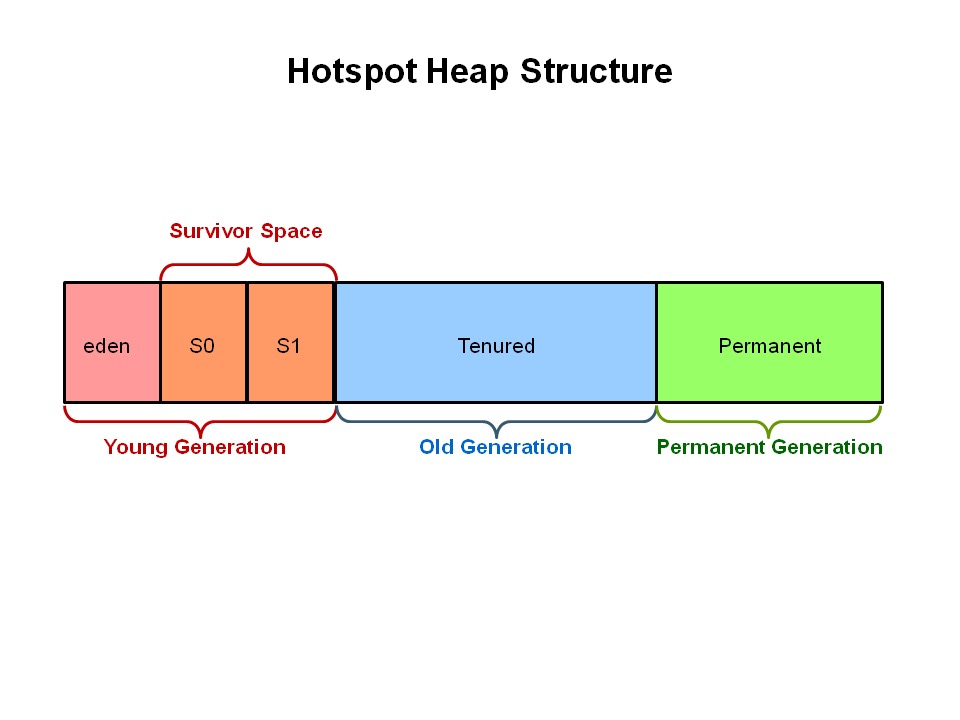
这里主要介绍这个比较新的垃圾回收器,在 G1 之前的垃圾回收器都是基于如下图的内存结构分布,有新生代,老年代和永久代(jdk8 之前),然后G1 往前的那些垃圾回收器都有个分代,比如 serial,parallel 等,一般有个应用的组合,最初的 serial 和 serial old,因为新生代和老年代的收集方式不太一样,新生代主要是标记复制,所以有 eden 跟两个 survival区,老年代一般用标记整理方式,而 G1 对这个不太一样。

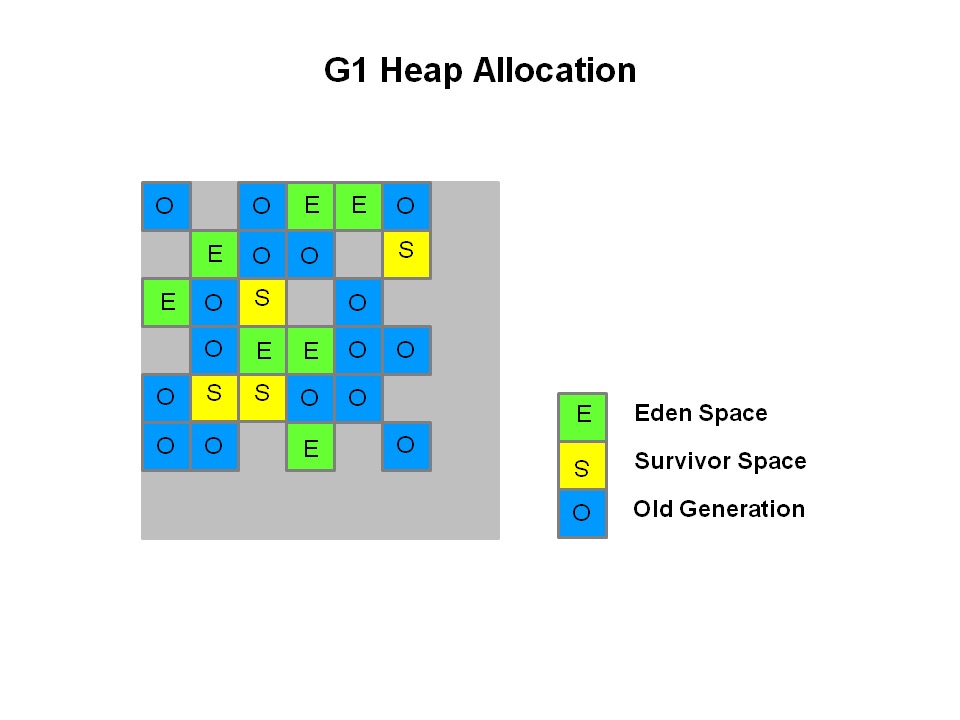
看一下 G1 的内存分布

可以看到这有很大的不同,G1 通过将内存分成大小相等的 region,每个region是存在于一个连续的虚拟内存范围,对于某个 region 来说其角色是类似于原来的收集器的Eden、Survivor、Old Generation,这个具体在代码层面

1
2
3
4
5
6
7
8
9
10
11
12
13
14
15
16
17
18
19
20
21
22
23
24
25
26
27
28
29
30
31
32
33
34
35
36
37
38
39
40
41
42
43
44
45
46
47
48
49
50
51
52
53
54
55
// We encode the value of the heap region type so the generation can be
// determined quickly. The tag is split into two parts:
//
// major type (young, old, humongous, archive) : top N-1 bits
// minor type (eden / survivor, starts / cont hum, etc.) : bottom 1 bit
//
// If there's need to increase the number of minor types in the
// future, we'll have to increase the size of the latter and hence
// decrease the size of the former.
//
// 00000 0 [ 0] Free
//
// 00001 0 [ 2] Young Mask
// 00001 0 [ 2] Eden
// 00001 1 [ 3] Survivor
//
// 00010 0 [ 4] Humongous Mask
// 00100 0 [ 8] Pinned Mask
// 00110 0 [12] Starts Humongous
// 00110 1 [13] Continues Humongous
//
// 01000 0 [16] Old Mask
//
// 10000 0 [32] Archive Mask
// 11100 0 [56] Open Archive
// 11100 1 [57] Closed Archive
//
typedef enum {
FreeTag = 0,

YoungMask = 2,
EdenTag = YoungMask,
SurvTag = YoungMask + 1,

HumongousMask = 4,
PinnedMask = 8,
StartsHumongousTag = HumongousMask | PinnedMask,
ContinuesHumongousTag = HumongousMask | PinnedMask + 1,

OldMask = 16,
OldTag = OldMask,

// Archive regions are regions with immutable content (i.e. not reclaimed, and
// not allocated into during regular operation). They differ in the kind of references
// allowed for the contained objects:
// - Closed archive regions form a separate self-contained (closed) object graph
// within the set of all of these regions. No references outside of closed
// archive regions are allowed.
// - Open archive regions have no restrictions on the references of their objects.
// Objects within these regions are allowed to have references to objects
// contained in any other kind of regions.
ArchiveMask = 32,
OpenArchiveTag = ArchiveMask | PinnedMask | OldMask,
ClosedArchiveTag = ArchiveMask | PinnedMask | OldMask + 1
} Tag;

hotspot/share/gc/g1/heapRegionType.hpp

当执行垃圾收集时,G1以类似于CMS收集器的方式运行。 G1执行并发全局标记阶段,以确定整个堆中对象的存活性。标记阶段完成后,G1知道哪些region是基本空的。它首先收集这些region,通常会产生大量的可用空间。这就是为什么这种垃圾收集方法称为“垃圾优先”的原因。顾名思义,G1将其收集和压缩活动集中在可能充满可回收对象(即垃圾)的堆区域。 G1使用暂停预测模型来满足用户定义的暂停时间目标,并根据指定的暂停时间目标选择要收集的区域数。

由G1标识为可回收的区域是使用撤离的方式(Evacuation)。 G1将对象从堆的一个或多个区域复制到堆上的单个区域,并在此过程中压缩并释放内存。撤离是在多处理器上并行执行的,以减少暂停时间并增加吞吐量。因此,对于每次垃圾收集,G1都在用户定义的暂停时间内连续工作以减少碎片。这是优于前面两种方法的。 CMS(并发标记扫描)垃圾收集器不进行压缩。 ParallelOld垃圾回收仅执行整个堆压缩,这导致相当长的暂停时间。

需要重点注意的是,G1不是实时收集器。它很有可能达到设定的暂停时间目标,但并非绝对确定。 G1根据先前收集的数据,估算在用户指定的目标时间内可以收集多少个区域。因此,收集器具有收集区域成本的合理准确的模型,并且收集器使用此模型来确定要收集哪些和多少个区域,同时保持在暂停时间目标之内。

注意:G1同时具有并发(与应用程序线程一起运行,例如优化,标记,清理)和并行(多线程,例如stw)阶段。Full GC仍然是单线程的,但是如果正确调优,您的应用程序应该可以避免Full GC。

在前面那篇中在代码层面简单的了解了这个可预测时间的过程,这也是 G1 的一大特点。